Table of Contents
Introduction: Purpose and Benefits of Auditing Your HubSpot Portal | Where to Start: Define Audit Goals | Auditing Your HubSpot Settings and CRM | Auditing Your Marketing Hub | Auditing Your Sales Hub | Get the Full Guide
The Purpose and Benefits of Auditing Your HubSpot Portal
As a savvy business owner, you’ve equipped your team with the tools they need to work efficiently and collaboratively. Choosing HubSpot was a smart move (and we couldn’t agree more!). You’ve implemented it into your processes and trained your team.
But after implementation and training, do you stop there?
Just like your car requires regular maintenance to keep running smoothly, your HubSpot portal needs ongoing fine-tuning. In fact, regularly auditing your HubSpot portal is one of the best ways to maintain the efficiency and accuracy of your business operations.
These audits help you catch issues like outdated workflows, inaccurate data, and misconfigured settings before they escalate into bigger problems. They ensure that your portal is optimized and aligned with your goals and that your investment in the software continues to pay off.
Audits also boost the effectiveness of your marketing, sales, and customer service efforts, leading to improved performance across the board. A thorough audit can uncover underutilized features or opportunities to streamline processes, helping you save time and reduce costs.
In short, auditing your HubSpot portal maximizes your return on investment, helps ensure data integrity, and empowers your team to work more efficiently.
How Frequently to Audit
Regular audits help you stay proactive, ensuring your HubSpot portal continues to deliver optimal results. However, the frequency of your audits will depend on how you use the asset.
A good guideline is to audit your HubSpot portal at least once per year. More frequent audits may be necessary if your business undergoes significant changes, such as a shift in strategy, new product launches, or updates to your marketing and sales processes.
Where to Start: Define Audit Goals
When conducting a HubSpot portal audit, the first step is to define clear goals. These goals should align with your long-term business objectives and target specific areas for improvement within your HubSpot instance.
Here are some examples of impactful goals:
- Increase marketing email conversions
- Refine the deal pipeline
- Clean up the contacts database
- Enhance reporting accuracy
- Optimize workflows and automation
Defining these goals allows you to tailor your audit process, ensuring you focus on the most critical aspects of your HubSpot portal.
Conducting a Full Portal Assessment
A full portal assessment is a comprehensive audit designed to optimize your entire HubSpot instance. This may include your HubSpot CRM (customer relationship management system), content management system (CMS), and the various Hubs to which you’re subscribed.
In the following sections, we’ll break down the steps required to assess your HubSpot settings, Marketing Hub, Sales Hub, Content Hub, and more. If you’re a hands-on learner, use our HubSpot Portal Assessment Template at the end of this guide alongside the written instructions below.

Auditing Your HubSpot Settings and CRM
This first step involves reviewing all the various aspects of your HubSpot instance to identify inefficiencies, ensure compliance, and align your CRM with your business goals. Here’s how to do it:
Note Products and Services in Use
Start by identifying the HubSpot products and services you use — like Marketing Hub, Sales Hub, Service Hub, etc. Understanding these tools helps assess their full utilization and alignment with your goals. Remember to evaluate third-party integrations and add-ons too.
Check Existing HubSpot Settings
Review the general settings of your HubSpot portal, including:
- Account settings
- Branding
- Domain configurations
- Email sending domains
Ensure these settings are correctly configured to accurately reflect your current business structure and branding. Misconfigurations can cause significant issues with functionality, data accuracy, and customer communications.
Review Users and Teams
Next, audit user permissions, roles, and team assignments to ensure everyone has the appropriate level of access to HubSpot tools and data. This step is crucial for maintaining data security and enabling users to perform their tasks effectively.
Additionally, review any inactive users and outdated team structures that may no longer be relevant.
Check GDPR and Its Usage
To ensure your HubSpot portal complies with GDPR, or the General Data Protection Regulation, and other data protection regulations, review the use of cookie banners, consent forms, and privacy notices.
Additionally, assess your form and email opt-in configurations to verify proper data collection and consent practices.
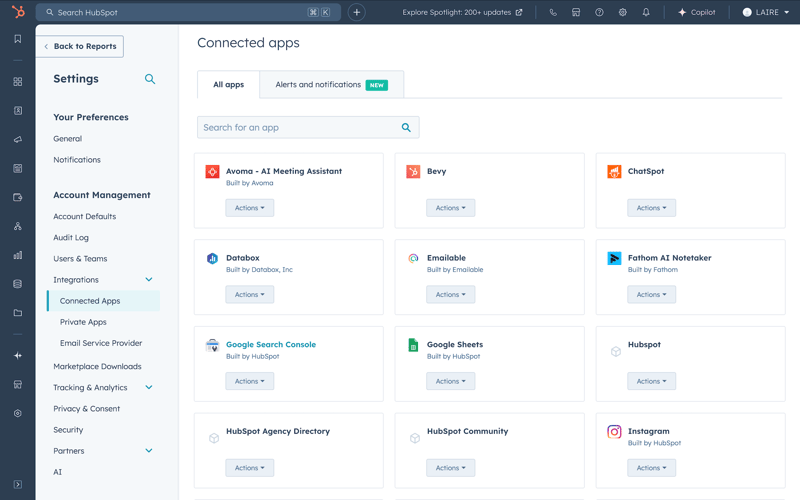
Review Integrations
Review all third-party integrations connected to your HubSpot portal to ensure they are functioning properly and are still necessary for your operations. Outdated or malfunctioning integrations can cause significant data sync issues, disrupt workflows, and compromise data integrity.
Audit Contacts, Companies, Lists, and Properties
Conduct a thorough audit of your CRM data, including contacts, companies, lists, and properties. Identify and remove duplicate or outdated entries. This process optimizes your HubSpot settings for maximum efficiency, improving operational effectiveness and enhancing data security.

Auditing Your Marketing Hub
To conduct a comprehensive audit of HubSpot's Marketing Hub, systematically evaluate each component of your marketing setup. Here’s a breakdown of the steps involved:
Email Marketing
Email Templates and Workflows
- Review all email templates for branding consistency, design quality, and content relevance. Ensure they align with your current marketing goals and are crafted to engage and delight your target audience.
- Evaluate your email workflows, checking that triggers, sequences, and actions are correctly set up. Identify any outdated or redundant workflows that need updating or removal.
Marketing vs Non-Marketing Contacts
- For accurate targeting, separate your contact database into marketing and non-marketing segments.
- Ensure marketing contacts are correctly identified and non-marketing contacts are excluded from any marketing communications.
Email Performance Metrics
- Examine key metrics like open rates, click-through rates, bounce rates, and unsubscribe rates. Continuous issues in these areas may indicate problems with deliverability, engagement, or content quality.
- Be sure to leverage HubSpot’s Email Health feature, which tracks overall performance and compares it to industry benchmarks. This tool can be found by clicking “Marketing”, and then “Email” in the left sidebar navigation. Once you’re there, click the “Health” tab in the top left.
Social Media
Connected Social Accounts and Posting Schedules
- Check that all connected social media accounts are functioning properly.
- Ensure posting schedules are up-to-date and aligned with your content calendar and marketing strategy.
Engagement Metrics
- Evaluate engagement metrics, including likes, shares, comments, and overall reach across all platforms.
- Assess the performance of your posts and identify the content types that resonate best with your audience.
Paid Ads
- Verify that your ad accounts (e.g., Google Ads, Facebook Ads) are properly connected to HubSpot.
- Analyze performance metrics like click-through rates and conversion rates.
- Evaluate the effectiveness of your ad campaigns in driving traffic and generating leads, and identify areas for optimization.
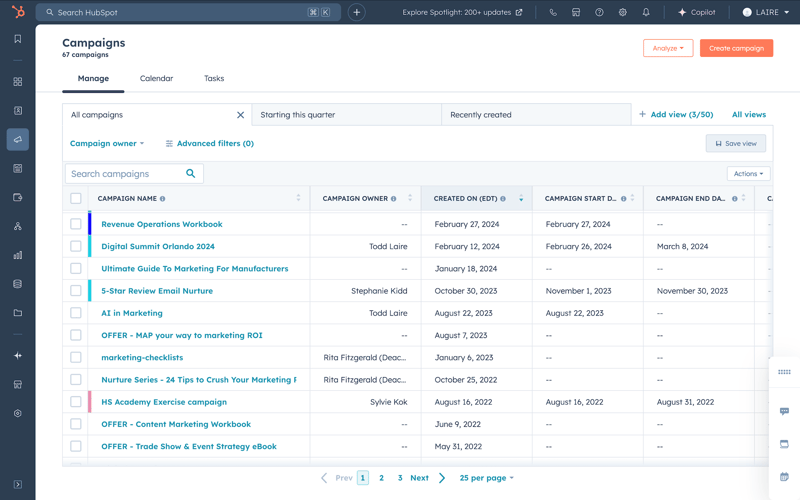
Campaigns
- Review active campaigns to ensure they were set up and executed correctly.
- Assess whether your campaigns are efficiently integrated with other marketing tools and channels.
- Determine if your campaigns are achieving the desired results and adjust your strategy as needed.
Forms
- Ensure forms are capturing the necessary information and are correctly integrated with your CRM and marketing workflows.
- Check that form placement on your website and landing pages is strategic, visible, and optimized for user experience.
Workflows
- Ensure workflows are correctly set up to automate marketing tasks, nurture leads, and manage customer interactions.
- Review workflow performance to identify bottlenecks or areas needing adjustment for improved effectiveness.

Auditing Your Sales Hub
Conducting an audit of HubSpot's Sales Hub helps optimize your sales processes and ensures your team effectively manages leads. Here’s a description of the steps involved:
Pipelines and Deals
Evaluate Deal Stages
- Review each deal stage in your sales pipelines to ensure they accurately reflect your current sales process. Stages should be clear, actionable, and aligned with the buyer’s journey.
- Analyze how deals progress through these stages and identify any bottlenecks. If deals are getting stuck, investigate the reasons and refine the criteria or processes for advancing deals.
Pipeline Configurations
- For businesses with multiple sales processes, ensure you have separate pipelines for different products, services, or customer segments to track performance and tailor the sales process.
- Review custom fields and properties associated with your pipelines to ensure they capture relevant information at each stage.
Automations
- Assess automated workflows associated with your pipelines, such as deal creation or stage progression. Ensure these automations are functioning correctly and supporting your sales team by reducing manual tasks and enhancing efficiency.
- Check that sales reps receive notifications and reminders when deals reach critical stages or need follow-up.
Performance Metrics
- Evaluate close rates for each pipeline and deal stage. Look for patterns, such as lower close rates at certain stages or for specific deal sizes, which may indicate areas for improvement.
- Measure the average time deals spend in each stage and the total time from start to close. Longer deal cycles may signal a need for better qualification criteria or improved sales enablement resources.
Lead Management
Lead Scoring
- Review your lead scoring model to ensure it accurately reflects the behaviors and attributes of your highest-quality leads. Update scoring criteria based on recent sales data.
- Analyze lead score distribution across your database to ensure leads are segmented into priority levels, allowing your sales team to focus on the most promising prospects.
Lifecycle Stages
- Ensure your lifecycle stages (Subscriber, Lead, MQL, SQL, Customer, etc.) are clearly defined and consistently applied across your CRM. Each stage should have specific criteria for progression.
- Review lead movement between lifecycle stages to ensure leads aren’t falling through the cracks or staying in the wrong stage for too long.
Audit Sequences
- Analyze open, click, and reply rates of your sales sequences. Low engagement may indicate a need to adjust content or timing.
- Identify drop-off points in sequences and refine messaging or adjust follow-up frequency as needed.
Evaluate Lead Nurturing Workflows
- Review trigger conditions for lead nurture workflows to ensure they capture the right leads at the right time.
- Assess the content delivered through nurturing workflows, ensuring it’s tailored to the lead’s stage in the buyer’s journey and encourages progression toward a purchase.
- Analyze conversion rates and identify drop-off points to optimize content or timing and improve funnel progression.