HubSpot sequences take a stack of small decisions to build. Who gets the outreach, how many steps it runs, what each email says, when the follow-ups land, and which contacts should never be enrolled at all. Each decision is easy on its own. Making every one of them carefully, every time, is where the afternoon goes.
This skill came out of our monthly Claude + HubSpot office hours. One attendee had already used Claude to write follow-up emails and wanted to know why the rest of the job wasn’t possible:
“I just tell it, I want to send these three emails to this segment list, every 10 days, send a new one. And if you get it to do it, it just doesn’t quite work. It would really just make life so easy. I find myself having to work with Claude, then I jump over to the HubSpot agent.”
So we built the HubSpot Sequence Launcher. It interviews you about the campaign and drafts every email. Then it builds the sequence inside HubSpot, cleans the contact list, and enrolls the contacts. You approve three things: the copy, the contacts, and the moment sending starts. Claude handles the steps in between.
What can Claude automate in HubSpot sequences?
You can use Claude Skills to automate HubSpot sequences end to end. A skill packages the process as instructions Claude follows on every run: intake questions, email drafts, the build inside HubSpot through Claude's built-in browser, contact cleanup, and enrollment. A person approves the copy, the contact list, and the go-live before any email sends.
- A Claude skill turns your sequence process into instructions Claude follows the same way on every run.
- Claude builds the sequence in the HubSpot interface through Cowork's built-in browser, using a login you enter yourself.
- Three approval gates (copy, contacts, go-live) keep a person in charge of anything that reaches a buyer.
- The skill enforces sequence hygiene, including unenroll rules, contact exclusions, and HubSpot's enrollment limits.
- Sequences require a Sales Hub or Service Hub Professional or Enterprise seat, with or without Claude.
Why use Claude Skills for HubSpot sequences?
A Claude skill is a folder of instructions, and sometimes scripts, that Claude loads when a task calls for it. Anthropic introduced Agent Skills in October 2025. Each skill starts with a SKILL.md file whose short description tells Claude when to use it. Claude scans those descriptions and loads the full instructions only for the skill that matches, so a team can keep many skills installed without cluttering every conversation.
Loading instructions on demand fits HubSpot sequences well. A sequence build follows the same order every time and punishes small mistakes. Think of a follow-up that fires on a weekend, or a contact who's already mid-sequence with another rep. You could describe all of that in a long prompt and hope someone pastes it in. A skill makes Claude follow the same defaults, checks, and house style on every run without anyone remembering to ask.
Our Sequence Launcher triggers on requests like "build a HubSpot sequence" or "enroll contacts in a sequence." From there, Claude knows what to ask, what to draft, where to click, and when to stop for a person.
How HubSpot sequence automation works: 7 steps
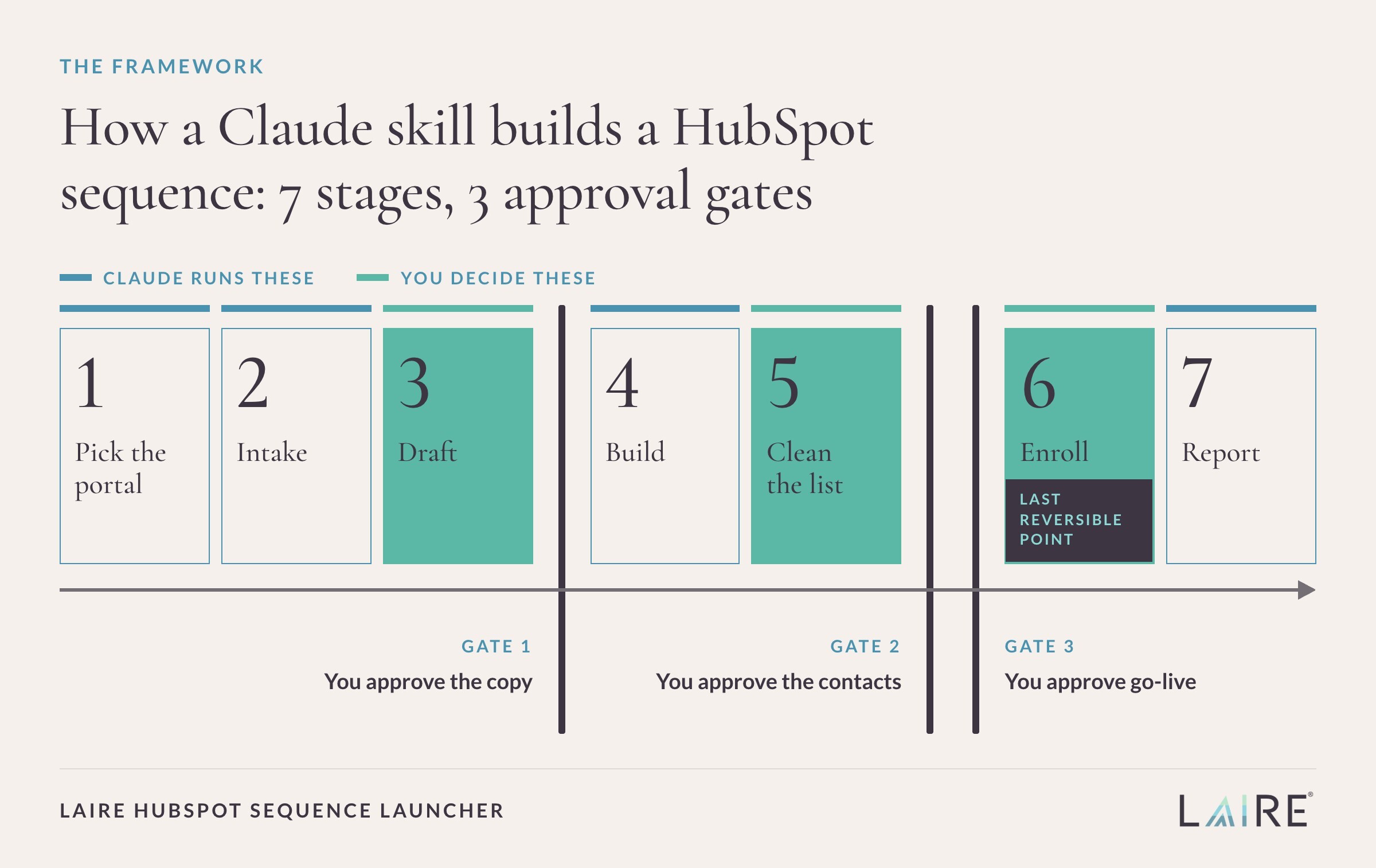
Here's how the work splits between Claude and the person running the sequence, stage by stage.
|
Stage |
What Claude does |
What you do |
|
1. Pick the portal |
Asks which HubSpot account to use, then confirms the account name shown in HubSpot before changing anything |
Choose the portal |
|
2. Intake |
Asks about the goal, audience, number of steps and spacing, offer and sender, and stop rules, then fills any gaps with stated defaults |
Answer one short batch of questions |
|
3. Draft |
Writes each step's subject line, body, personalization, and delay, and pulls the real contact list from the CRM |
Approve or edit the copy (Gate 1) |
|
4. Build |
Creates the sequence in HubSpot, adds every step, saves it, and checks what's on screen against the approved copy |
Nothing |
|
5. Clean the list |
Removes contacts who are unsubscribed, bounced, missing an email, duplicated, or already in another sequence |
Approve the list (Gate 2) |
|
6. Enroll |
Enrolls the approved contacts with the right sender, time zone, and first-send timing |
Approve go-live (Gate 3) |
|
7. Report |
Returns the sequence link, enrolled and skipped counts with reasons, the first send time, and how to unenroll |
Review the summary |
Everything in the right-hand column is a decision about your buyers or your brand. The clicking, pasting, list filtering, and double-checking move to Claude, which is where most of the build time goes.
How Claude builds sequences directly in HubSpot
The skill works in HubSpot the way a rep would, through the sequences tool in a browser. In August 2026, Anthropic gave Cowork a built-in browser that can navigate sites, click, and fill in forms while you keep working. The Sequence Launcher uses that browser to open the portal's sequences page and start a sequence from scratch. Claude names the sequence, sets the unenroll rules, and adds each automated email with its subject, body, and delay.
We chose the browser over HubSpot's API on purpose. HubSpot's Sequences API can create, update, and enroll sequences, but it only works with apps configured for user-level access. For a team running a few campaigns a month, standing up and maintaining that app can be more work than the sequences themselves. The browser path runs on the seat and login you already have.
Contact data is the one piece the skill reads through a connector. Claude searches the CRM through the HubSpot connector to resolve the list, so the contact approval shows real names and companies instead of a list ID.
Two habits keep the browser build dependable. Claude takes a screenshot before each click and finds buttons by reading the page, so a small change to HubSpot's interface won't send Claude clicking in the wrong place. After saving, Claude reads the finished step list back, compares every email to the approved copy, and fixes any difference before moving on.
3 approval steps that keep HubSpot sequences safe
Automation earns trust when everyone knows where a person signs off. The skill has exactly three approval gates and pauses nowhere else unless something breaks or looks ambiguous.
- Gate 1, sequence approval: Claude shows the name, sender, stop rules, and a table with the send day, subject, and full body of every email. Nothing changes in HubSpot until you approve or send edits.
- Gate 2, contact approval: Claude shows the final count, every exclusion with its reason, and a sample of the first 10 contacts with names, companies, and emails.
- Gate 3, go-live approval: Claude states how many contacts will enroll, which sender they'll come from, and when step one goes out, then waits for an explicit yes.
Gate 3 sits directly before the enroll click for a specific reason. In HubSpot, the first sequence email goes out as soon as possible after enrollment unless you schedule it for later. Enrolling is sending, so the skill treats it as the one action in the run you can't take back.
A few hard rules surround the gates:
- Claude never types a HubSpot password, MFA code, or token. If a login page appears, you sign in yourself in the browser pane and tell Claude to continue.
- If enrollment throws an error, Claude stops and reports it instead of retrying, because a blind retry could enroll the same contacts twice.
- If the Sequences tool is missing or locked in a portal, Claude stops and reports it.
These rules mirror how we use AI across LAIRE. Our AI policy keeps a person in the loop on every deliverable. A sales email in a buyer's inbox is about as client-facing as work gets.
HubSpot sequence best practices and limits
LAIRE's own portal runs 33 sequences, and most of the trouble we've seen traces back to settings and list hygiene rather than copy. The skill's defaults cover the issues that cause the most cleanup later. If sequences are new to your team, start with our overview of HubSpot sequences.
- Unenroll on reply and on meeting booked: HubSpot unenrolls contacts automatically when they reply or book a meeting through the sequence. The skill keeps both rules on unless you ask otherwise.
- Business-day sends: follow-ups go out on business days inside a send window, so step three doesn't land on a Sunday.
- A starting cadence: four automated emails over about two weeks when you don't specify one. A sequence holds up to 10 email templates with delays of up to 90 business days, so the default leaves plenty of room to adjust.
- Personalization tokens: every email uses HubSpot tokens for the contact's and sender's first names instead of hand-typed names.
- One sequence per contact: HubSpot allows a contact in only one sequence at a time, so the skill excludes anyone already enrolled elsewhere.
- Clean recipients: unsubscribed, bounced, duplicate, and email-less contacts come off the list before you see it. Good CRM data hygiene makes this step faster.
- Batch-aware enrollment: HubSpot bulk-enrolls up to 50 contacts at a time, sends at most three emails per minute during bulk enrollment, and caps daily sequence sends by subscription. The skill splits larger lists into batches and flags anything over the limit.
The skill also carries our own house rules, like no dashes in email copy and a meeting link in every sequence. Put your team's rules in the same place and every sequence comes out sounding like your team. For the writing itself, our sales email psychology tips and email deliverability checklist still apply.
How to build your own Claude skill for HubSpot
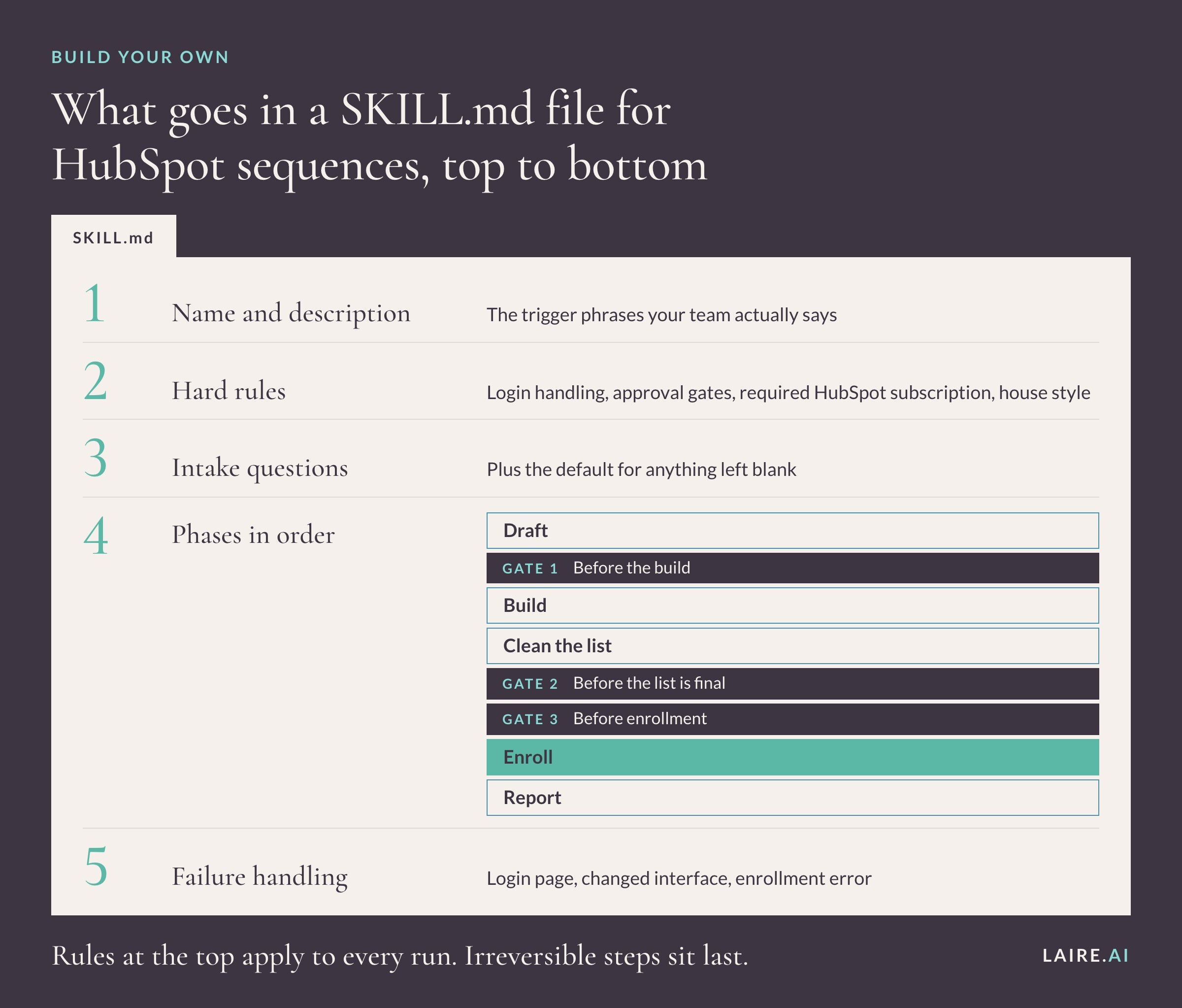
Our Sequence Launcher is a single SKILL.md file, and yours can start the same way. These seven steps are the order we'd follow.
|
Step |
What to do |
Why it matters |
|
1. Write a trigger-ready description |
Name the skill and describe when to use it in under 200 characters, using the phrases your team says, like "build a sequence" or "enroll contacts" |
Claude decides when to load a skill from its description |
|
2. Put hard rules first |
Login handling, the approval gates, the required HubSpot subscription, and your house style |
Rules at the top apply to every run |
|
3. Define the intake |
List the questions Claude asks and the default for anything left blank |
Fewer questions and more consistent sequences |
|
4. Write the phases in order |
Draft, build, clean the list, enroll, report, with gates before the build, before the list is final, and before enrollment |
Irreversible steps happen last, after approval |
|
5. Plan for failure |
Spell out what to do on a login page, a changed interface, or an enrollment error |
Prevents double enrollment and silent failures |
|
6. Package and enable |
Zip the skill folder with SKILL.md at its root, then turn it on under Customize > Skills |
Makes the skill available in Claude |
|
7. Test on a demo portal |
Run it against a test portal and a small internal list before a live campaign |
Confirms every click lands where you expect |
Here's the go-live gate as it reads in our skill. Writing the exact confirmation into the instructions keeps the final question plain every time:
"Enrolling N contacts now will start sending from <sender>. Step 1 goes <time/now>. Proceed?"
For requirements, you'll need a Sales Hub or Service Hub Professional or Enterprise seat for sequences, plus a Claude plan with Cowork's built-in browser. Anthropic lists the browser on Pro, Max, and Team plans in the desktop app, and Enterprise admins can turn it on. Custom skills also need code execution enabled, per Anthropic's guide to creating custom skills. Anthropic recommends starting the browser on trusted sites, since its safeguards reduce prompt-injection risk without removing it. Keep the skill pointed at your HubSpot portal.
What Claude automates vs. what your sales team owns
The skill removes the mechanical half of a sequence. The thinking half stays with your team: which accounts deserve outreach right now, what offer earns a reply, and how to answer the person who writes back. Unenroll-on-reply exists because a reply is where the sales conversation starts, and that conversation belongs to a person.
The split between mechanical work and judgment is how we think about AI in sales generally. Use AI to speed up the work around your team's expertise, and keep your people on the decisions and conversations that carry risk. We go deeper on that line in will AI replace your sales team. Our HubSpot workflow best practices cover the automation that feeds contacts into a sequence and picks them up afterward.
FAQs about HubSpot sequences and Claude
Can Claude create HubSpot sequences automatically?
Yes. Through Cowork's built-in browser, Claude can create a sequence in HubSpot's interface, add each step, and enroll contacts while you're signed in. HubSpot's Sequences API also supports creating sequences for apps configured with user-level access.
What HubSpot subscription do I need for sequences?
You need an assigned Sales Hub or Service Hub seat on a Professional or Enterprise subscription. If the Sequences tool is missing or locked in your portal, the skill stops and tells you before it builds anything.
Can Claude send HubSpot emails without approval?
No. Enrolling contacts starts sending, so the skill waits for an explicit yes at the go-live gate before it clicks enroll. You also approve the copy and the contact list before that point.
Is it safe to use Claude with HubSpot?
The skill never handles your password or MFA code, because you sign in yourself. Cowork's browser runs separately from your personal browser and its data. Anthropic says its safeguards reduce prompt-injection risk but can't remove it, so limit the skill to your portal and read each gate before approving.
What's the difference between HubSpot sequences and workflows?
Sequences send one-to-one sales emails and tasks from a rep's connected inbox and stop when a contact replies or books a meeting. Workflows automate actions across records based on triggers, and on some subscriptions they can enroll contacts into a sequence.
How many contacts can I enroll in a HubSpot sequence?
Up to 50 in a single bulk enrollment. HubSpot sends at most three emails per minute during bulk enrollment and limits daily sequence sends by subscription, so larger lists go out in batches.
Join our Claude + HubSpot office hours
This skill exists because someone asked for it at office hours, which is the honest argument for coming. LAIRE is a HubSpot Diamond Solutions Partner, and we host a free session on the last Wednesday of every month at 11 a.m. Eastern. Each one takes a single Claude and HubSpot scenario end to end, shows the prompts and guardrails on screen, and closes with open Q&A. Recent sessions covered cleaning up HubSpot contact data and converting HubSpot companies with Claude.
Bring the sequence your team keeps meaning to build. Save your seat at Claude + HubSpot Office Hours.