The best AI marketing tools for most B2B teams are often the ones you already pay for. Your CRM and workspace suite now include AI that drafts and summarizes inside the systems where your customer data lives. Specialist tools earn a place on top when they do a job those platforms can't, like tracking your brand in AI search.
What's left to decide is which tools deserve a license, and in what order. Each of the 15 tools below has a defined job in a B2B stack and a limitation worth knowing.
This list carries no affiliate links or paid placements. LAIRE is a HubSpot Diamond Partner, so weigh that entry accordingly. If you're still gathering ideas, start with these ways to use AI in marketing.
The best AI marketing tools for B2B teams, compared
This table lists every tool in the guide by stack layer, with the job it does best and its lowest published price.
|
TOOL |
STACK LAYER |
BEST FOR |
STARTING PRICE |
|
HubSpot Breeze |
Own: CRM |
Teams already running HubSpot |
Included in Marketing Hub; Starter from $20/seat/mo |
|
Gemini or Microsoft 365 Copilot |
Own: workspace |
Email, documents and meetings |
Gemini included in Workspace from $14/user/mo; Copilot add-on $21/user/mo |
|
ChatGPT Business |
Connect: assistant |
Research and analysis across the team |
$20/user/mo |
|
Claude Team |
Connect: assistant |
Long documents and brand-sensitive writing |
$20/seat/mo |
|
Zapier |
Connect: automation |
Moving data between CRM, forms and AI |
Free plan; Professional from $19.99/mo |
|
Jasper |
Add: content |
Brand voice at content volume |
$59/seat/mo |
|
WRITER |
Add: content |
Governed content for regulated teams |
Quoted; Starter trial available |
|
Semrush |
Add: SEO and AI visibility |
SEO research plus AI search tracking |
$117.33/mo; AI tracking from $165.17/mo |
|
Surfer |
Add: SEO |
Optimizing individual pages |
From $49/mo |
|
Profound |
Add: AI visibility |
Dedicated AI answer engine tracking |
Free trial; quoted |
|
Clay |
Add: data |
Account research and enrichment |
Free plan; credit-based paid plans |
|
6sense |
Add: intent |
Account intent and ABM |
Quoted |
|
Canva |
Add: creative |
On-brand design across the team |
$250/person/yr (about $21/mo) |
|
Descript |
Add: creative |
Webinar, podcast and video editing |
$16/person/mo |
|
Dreamdata |
Add: measurement |
Account-based revenue attribution |
Free plan; Advanced quoted |
Prices are each vendor's lowest published paid tier in US dollars, on annual billing where the vendor shows it, excluding promotions.
Six tests decided which tools made this list
Nearly every B2B marketing team already has AI in place. In the Content Marketing Institute's 2026 research, 95% of B2B marketers said their organizations use AI-powered applications.
Gartner's 2026 CMO Spend Survey found CMOs allocate an average of 15.3% of marketing budgets to AI, yet only 30% reported mature or fully developed AI readiness capabilities. Most of those respondents work at companies earning more than $1 billion a year.
With that much spend in play, every tool here had to pass six tests.
- It fits B2B buying. It handles accounts, buying committees and long sales cycles.
- It connects to your system of record. It works with your CRM natively or through a documented integration.
- Admins can control it. Business plans offer user management and a published position on model training.
- It does a specific job. We can name the task it handles better than the layers beneath it.
- It's generally available. Each tool is a released product with public documentation, and we confirmed its AI features on its own website in October 2026.
- The buying path is clear. Pricing is published, or the vendor states its sales process.
We left out general productivity apps, consumer and ecommerce tools, and anything whose own pages couldn't support our claims. We didn't star-rate anything, because we haven't run controlled tests.
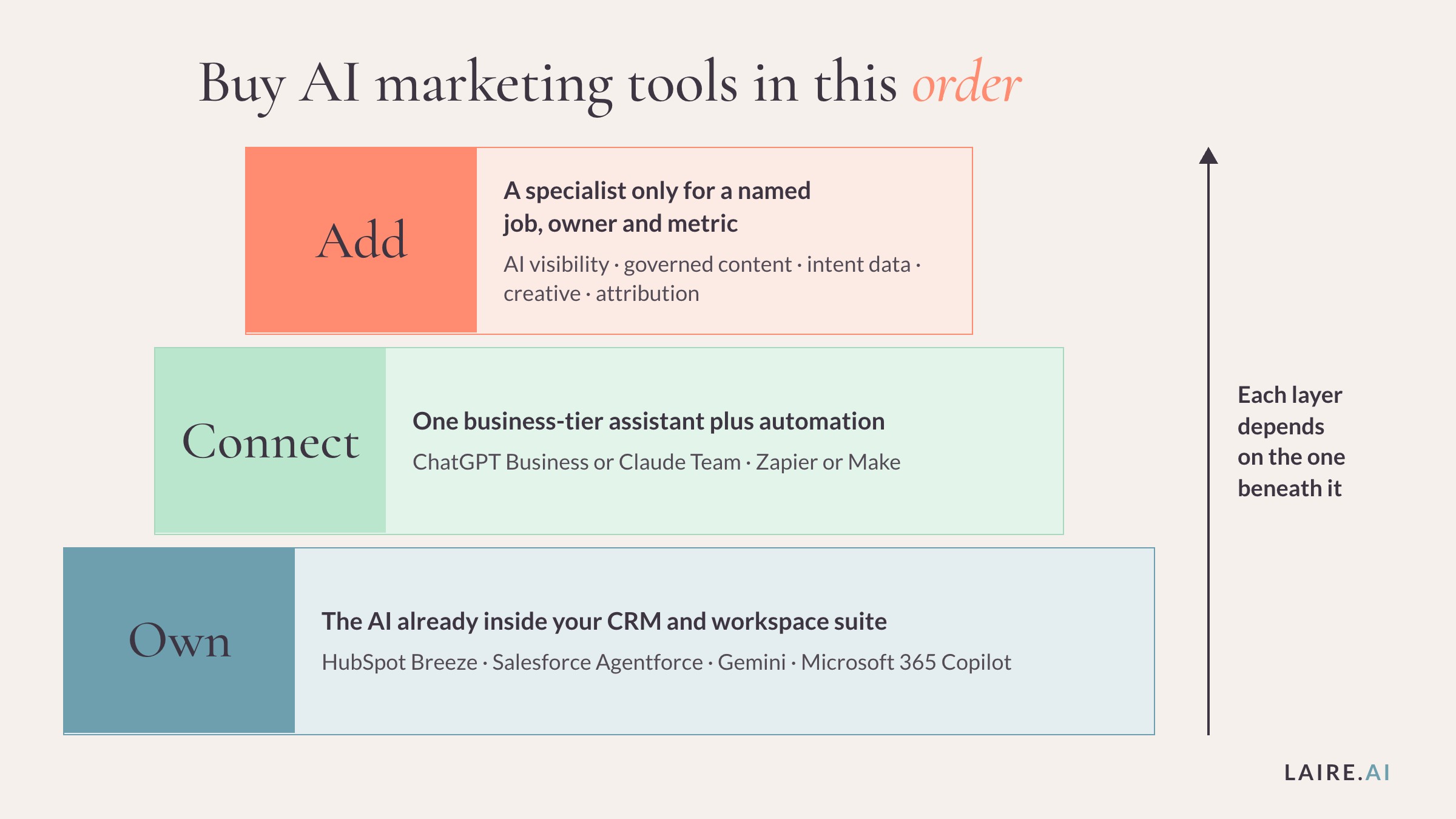
Buy AI marketing tools in this order: own, connect, add
The order you add AI tools matters more than which brand you pick. AI is only as useful as the data and context it can reach, so each layer depends on the one beneath it.
Own. Switch on the AI in the platforms you already license. Your CRM's AI sees contacts, deals and email history, while your workspace AI sees documents and meetings. Both have already passed IT review, and the AI is often part of what you pay.
Connect. Standardize on one business-tier assistant for work that crosses platforms. Then add automation that keeps your systems in sync so the AI works on current data.
Add. Buy a specialist tool only when you can name the job, the owner and the metric. "Track how often AI assistants recommend us, owned by the SEO lead, reported monthly" qualifies. "We should probably have an AI writing tool" doesn't.
Skipping to the third layer usually means tools that can't see CRM data. It also means security reviews for unfamiliar vendors and two subscriptions doing one job.
Most of what LAIRE uses sits in the first two layers. The tools in our AI policy include Breeze AI, Gemini, Copilot, ChatGPT, Claude and Replit.
Start with the AI inside the platforms you already pay for
Check what your current contracts include before you buy anything new.
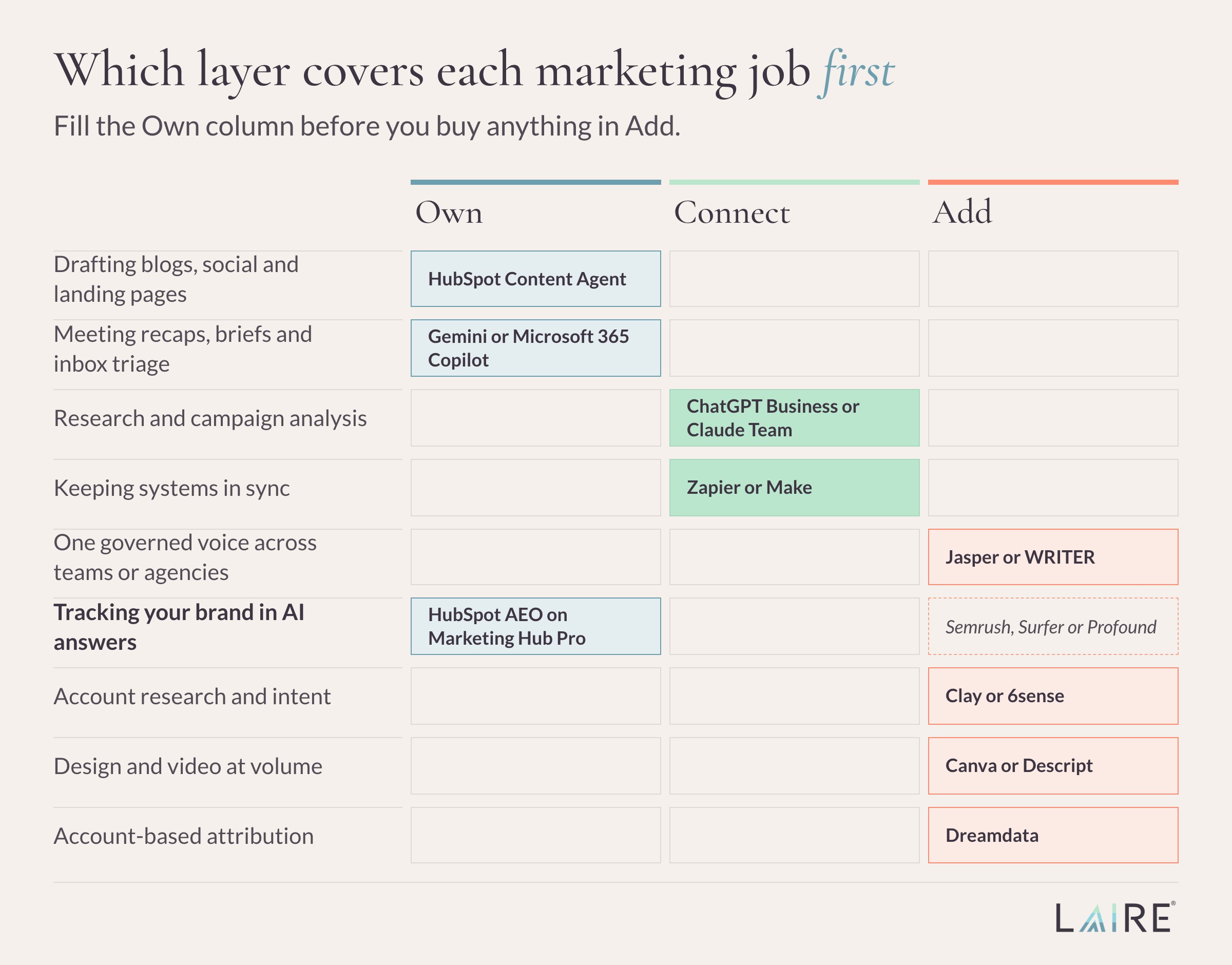
HubSpot Breeze: best for teams already running HubSpot
Breeze is the AI layer across HubSpot. Breeze Assistant drafts and summarizes inside the CRM, and Agent Hub adds agents for content, prospecting, customer service and data work. HubSpot says its Content Agent creates blog posts, social content and landing pages using your brand voice and audience data.
Because Breeze works on the contacts, deals and emails already in your portal, its output reflects your pipeline. Salesforce teams get comparable agents in Marketing Cloud through Agentforce. For the revenue side, see HubSpot's AI tools for RevOps.
HubSpot also sells AEO tracking for brand mentions in ChatGPT, Gemini and Perplexity. It's included with Marketing Hub Professional and Enterprise, or $50 a month on its own.
Watch for: The Prospecting, Customer and Data agents use HubSpot Credits, so cost grows with usage on top of seats.
Pricing: Agent Hub comes with every paid tier. Marketing Hub Starter lists from $20 per seat a month, and Professional from $890 a month with three seats.
Disclosure: LAIRE is a HubSpot Diamond Partner and helps clients put Breeze to work.
Gemini or Microsoft 365 Copilot: best for everyday email, documents and meetings
Google includes Gemini in Workspace Business and Enterprise plans across Gmail, Docs and Meet. Microsoft sells Microsoft 365 Copilot Business as an add-on with prebuilt agents such as Researcher and Analyst.
This is where meeting recaps, first-draft briefs and inbox triage happen. Google states that Workspace doesn't use customer data to train models without permission. Microsoft states that prompts and Graph data aren't used to train foundation models.
Watch for: Gemini's full feature set starts on Business Standard. Copilot requires an eligible Microsoft 365 business plan.
Pricing: Workspace Business Standard, Gemini included, is $14 per user a month on an annual plan. The Copilot Business add-on lists at $21 per user a month with annual billing.
Add a business-tier assistant and connect it to your stack
Built-in AI is strongest inside its own platform. A general assistant takes the work that spans platforms, such as competitor research or a long report. Standardize on one, on a plan that keeps your data out of model training.
Pick by the work you do most. ChatGPT suits teams that live in data analysis and custom GPTs, while Claude suits teams working through long documents and brand-sensitive drafts.
We run both because agency work spans both. A subject matter expert fact-checks anything AI-assisted before it's final.
ChatGPT Business: best for research and analysis across the team
ChatGPT Business gives each seat custom GPTs, Projects, deep research, ChatGPT agent and data analysis.
B2B teams use it to analyze campaign data and to build custom GPTs loaded with messaging and persona documents. OpenAI says it can pull customer context from Salesforce and HubSpot, and it doesn't train on business data by default. Our AI Prompts Library has 100 marketing prompts to start with.
Watch for: There's a two-seat minimum, and heavy use beyond rate limits draws on credits.
Pricing: $20 per user per month, billed annually ($25 when billed monthly). Enterprise is quoted.
Claude Team: best for long documents and brand-sensitive writing
Claude Team includes Projects, which keep shared files and instructions attached to a body of work. Anthropic offers a HubSpot connector, with Salesforce in beta.
It suits work with heavy source material, like turning interview transcripts into a case study. Anthropic states it doesn't use inputs or outputs from its commercial products to train models by default. Our head-to-head comparison of ChatGPT, Claude and Gemini covers the trade-offs.
Watch for: Each member has weekly usage limits, so your heaviest users may need Premium seats.
Pricing: $20 per seat per month, billed annually ($25 when billed monthly), for 2 to 150 seats.
Zapier: best for connecting your CRM, forms and AI without developers
Zapier moves data between apps and adds AI along the way. Its AI steps, Copilot builder and Zapier Agents work across more than 9,000 apps.
A typical B2B use is routing form fills into the CRM with an AI-written summary attached. It supports HubSpot and Salesforce, and we've shown how to connect ChatGPT to HubSpot workflows. Make is the main alternative, with AI agents on paid plans from $9 a month.
Watch for: Agents are priced separately by activity, and AI steps count against your task allowance.
Pricing: Free plan available. Professional starts at $19.99 per month.
When ChatGPT and Claude aren't enough for content
Before buying a content platform, test what you own. HubSpot's Content Agent, or a shared ChatGPT or Claude project loaded with your style guide, covers a lot of drafting. A dedicated tool pays off when several teams or agencies publish under one brand and need one governed voice.
Either way, AI-generated content doesn't carry SEO value on its own. Search engines still reward the E-E-A-T signals that come from real expertise.
Jasper: best for marketing teams producing content at volume
Jasper is an AI platform designed for marketing teams. Its Brand IQ layer stores your brand voice, style guide and visual guidelines, and its agents handle campaign content and repurposing.
Teams pick Jasper when consistency slips across many writers. The Business plan adds agents for GEO, translation and deep research.
Watch for: Pro includes two Brand Voices. Jasper lists Salesforce among its integrations, but not a native HubSpot integration.
Pricing: Pro is $59 per seat per month billed annually, or $69 billed monthly. Business is custom.
WRITER: best for regulated teams that need governed content
WRITER is an enterprise AI platform running on its own Palmyra models. It enforces your terminology and style guide across everything it produces, with AI guardrails that filter outputs for compliance.
For financial services firms, catching an unapproved term while drafting is cheaper than catching it in compliance review. WRITER lists SOC 2 Type II, HIPAA and ISO 27001 among its certifications.
Watch for: Audit logs, role-based access and SSO sit on the Enterprise plan. Starter includes basic guardrails only.
Pricing: Not published. Starter is per seat with a 14-day free trial; Enterprise is quoted.
SEO and AI visibility tools show where buyers find you
Your buyers can ask ChatGPT, Perplexity or Google's AI Mode for a vendor shortlist, and rank tracking can't see the answer. AI visibility tools fill that blind spot by running a set of prompts on a schedule and recording whether your brand is mentioned or cited. If the idea is new, start with Google's AI Overviews and our AI visibility best practices.
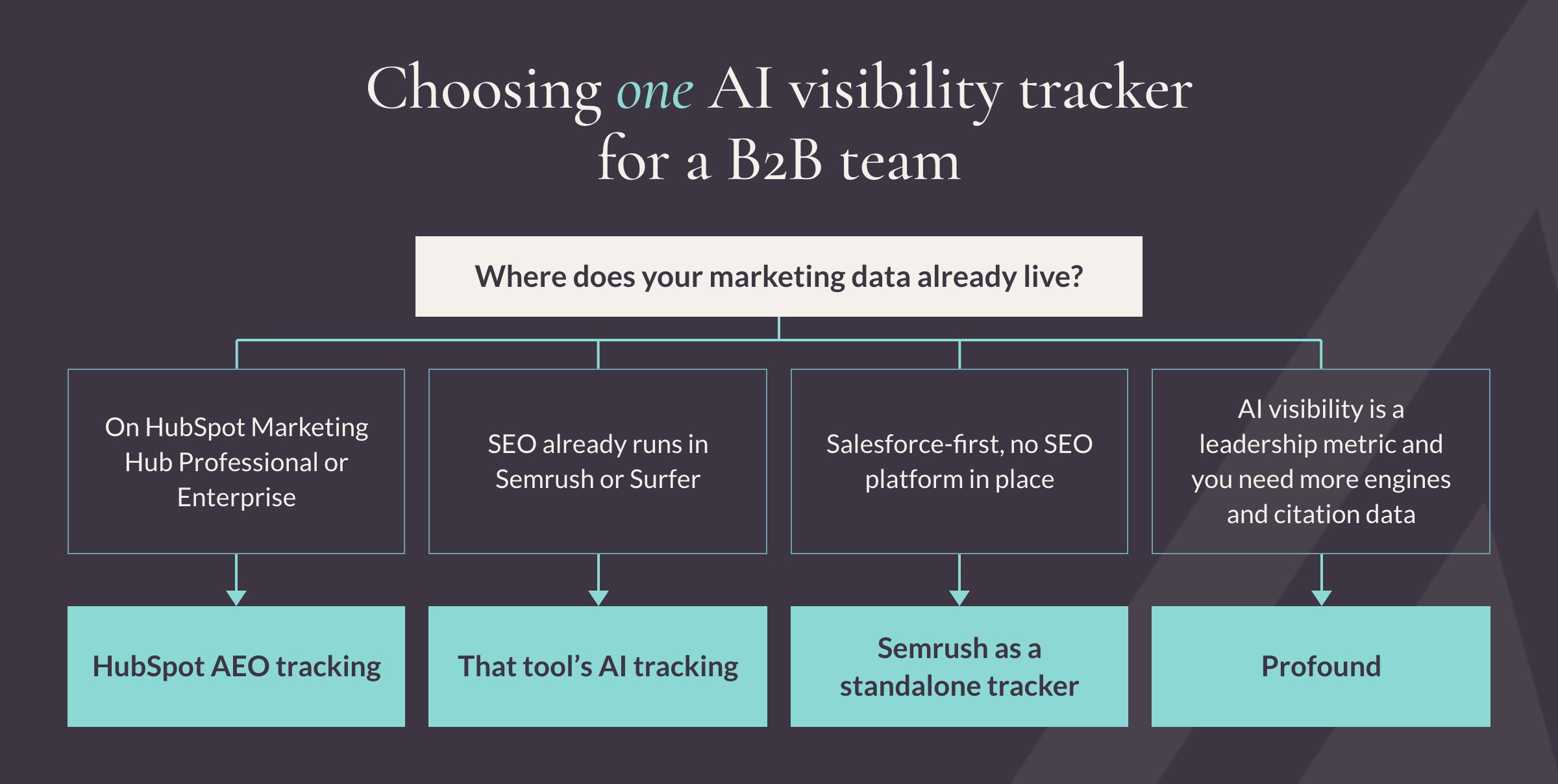
Most teams need one tracker, chosen by the platform they already run. On Marketing Hub Professional, start with HubSpot's AEO tracking, which is how we track LAIRE's own visibility with 23 buyer-style prompts. If SEO lives in Semrush or Surfer, use that tool's AI tracking.
Salesforce-first teams with no SEO platform in place can start with Semrush as a standalone tracker. Profound is the deeper option when AI visibility is a leadership metric and you need more engines and citation data.
Semrush: best for SEO research and AI search tracking in one place
Semrush covers keyword research, site audits and competitor analysis. Its AI Visibility Toolkit scores how often your brand appears in AI-generated answers, with share of voice and sentiment.
For a B2B team that already reports SEO from Semrush, AI answers land in the same dashboard. The Starter plan tracks 50 AI prompts daily across ChatGPT, Perplexity, Gemini and Google Search.
Watch for: AI prompt limits rise by plan, and the AI Visibility Toolkit has no free trial.
Pricing: The SEO plan is $117.33 a month, billed annually ($139 billed monthly). Starter, which adds AI search tracking, is $165.17 per month, billed annually ($199 billed monthly).
Surfer: best for optimizing individual pages and articles
Surfer's Content Editor gives live guidance on terms, structure and length as you write, based on pages that already rank. Its AI Tracker covers ChatGPT, Gemini, Perplexity and Google's AI features.
It fits teams refreshing existing posts and asking what a page lacks compared with what ranks. Treat the guidelines as input, since a page written to hit every suggested term usually reads that way.
Watch for: The entry Discovery plan doesn't include AI tracking, and daily tracking across all engines starts on Pro.
Pricing: From $49 per month, billed annually.
Profound: best for dedicated tracking across AI answer engines
Profound focuses entirely on AI search. It tracks brand visibility, sentiment and the sources cited in answers, across up to nine engines on its enterprise plan.
Its citation data shows which review sites, directories and publications the engines trust in your category. For a B2B team, that list doubles as a PR and partnership target list.
Watch for: The trial excludes exports, history and API access.
Pricing: Free seven-day trial, then quoted plans.
Data and intent tools find the accounts worth your time
Most of your target accounts aren't buying at any given moment. These tools show where to spend effort, which shapes AI lead generation results more than any writing tool.
Clay: best for building and enriching account lists
Clay pulls data from more than 150 providers into one table. Its AI research agent, Claygent, answers questions about each company or contact, such as recent funding or hiring activity.
Marketing and RevOps teams use it to build ABM lists and personalize outreach by account, then sync results to HubSpot or Salesforce.
Watch for: CRM auto-sync starts on the Growth plan, and cost tracks how much enrichment you run.
Pricing: Free plan with 100 data credits a month; paid plans are credit-based.
6sense: best for account intent and ABM at scale
6sense identifies which accounts are researching topics you care about, using keyword-level intent data, and runs ABM programs around them. Its AI Email Agents generate, send and reply to emails grounded in those buyer signals.
It earns its cost when deals are large and sales cycles run long. Smaller teams with a short target list often get further with Clay and a sharp ideal customer profile.
Watch for: It's a platform commitment, so plan for onboarding time before you see results.
Pricing: Quoted through sales.
Creative tools speed up design and video without adding headcount
Design and video requests usually outnumber the people who can fulfill them, so these tools put more production in marketers' hands.
Canva: best for on-brand design across the whole team
Canva's Magic Studio adds AI design generation and Magic Write to a platform most marketers know. Brand Kits and role-based permissions control who uses AI features and which fonts, colors and logos they apply.
With those controls set, a sales rep can build an on-brand one-pager without filing a design ticket. Your designers keep their time for campaign and brand work.
Watch for: Canva Teams is closed to new customers, and the replacement plan is priced per person, so cost rises with every seat.
Pricing: Canva Business is $250 per person a year.
Descript: best for editing webinars, podcasts and video
Descript lets you edit video and audio by editing the transcript. Underlord, its AI editing assistant, works inside the same project, and AI Speech supports custom voice clones.
Teams that run webinars or a podcast use it to turn one recording into clips and a blog transcript. Set an internal rule on voice cloning before anyone uses it.
Watch for: AI features draw on monthly AI credits, which vary by plan.
Pricing: Hobbyist is $16 per person per month, billed annually ($24 when billed monthly).
Attribution tools show which AI-assisted work paid off
Every tool above should earn its renewal. In B2B, proving that means tying activity to pipeline across long cycles and several stakeholders.
Dreamdata: best for account-based revenue attribution
Dreamdata connects activity across your stack and tracks it by account, treating each company as a group of stakeholders. It pulls from HubSpot, Salesforce, Microsoft Dynamics and Pipedrive.
Its Analytics Agent answers plain-language questions and recommends next steps, which helps when leadership asks what last quarter's AI spend produced.
Watch for: The free plan keeps two months of history for up to five seats, and attribution sits on the paid plan.
Pricing: Free plan available; Advanced is custom-priced.
7 questions to ask before you add another AI tool
Run every new AI tool through these questions before it reaches procurement. They catch the buying mistakes we see most often.
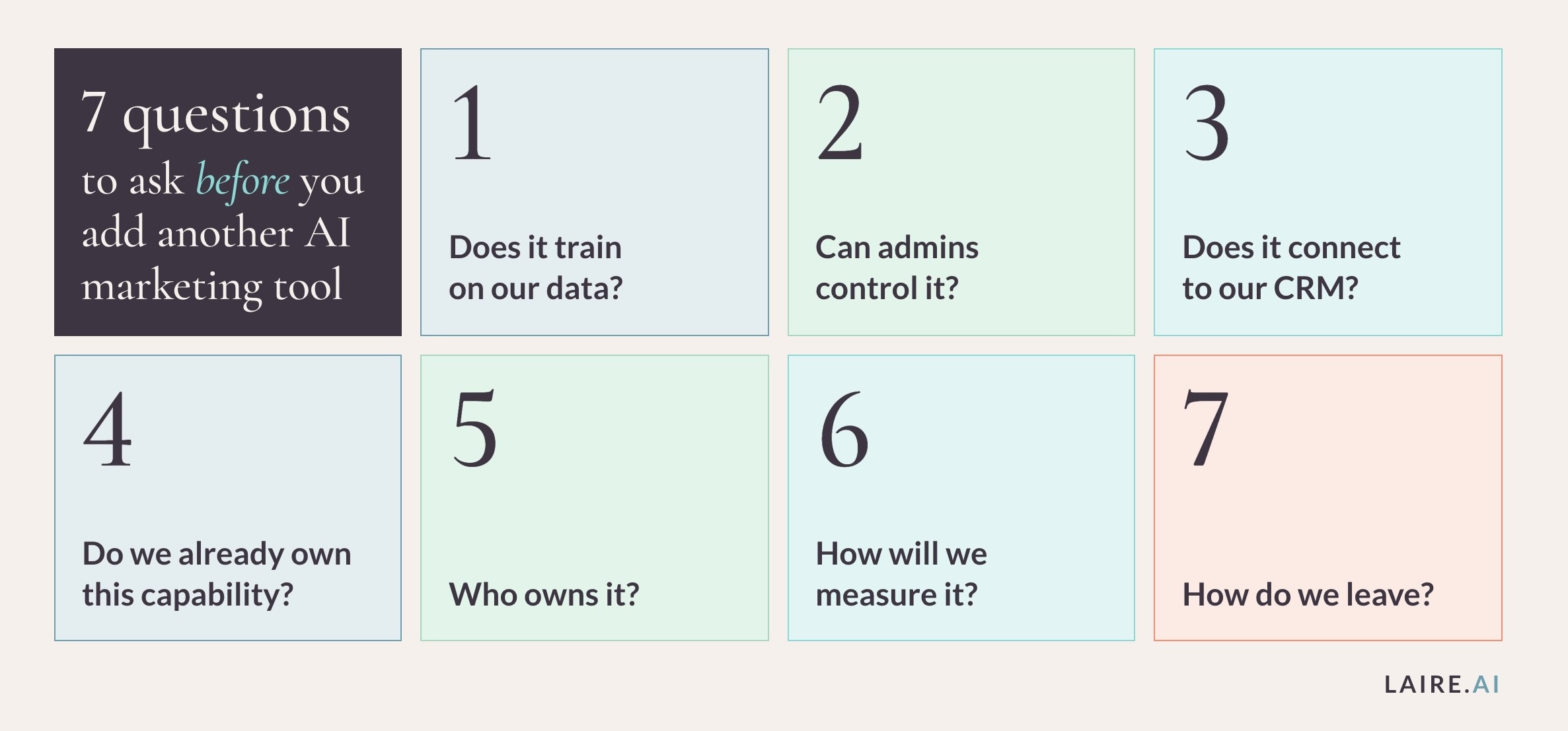
- Does it train on our data? Confirm your plan excludes your inputs from model training, and get that in the data processing agreement.
- Can admins control it? Look for SSO, user provisioning and audit logs, which often sit on enterprise tiers.
- Does it connect to our CRM? A tool that can't read or write to your system of record creates a disconnected copy of your customer data.
- Do we already own this capability? Check your CRM and workspace AI first. In our experience, overlap is where most wasted AI spend hides.
- Who owns it? Name one person responsible for setup, training and results.
- How will we measure it? Pick one metric before you buy, such as hours saved per campaign.
- How do we leave? Confirm you can export your data, prompts and brand settings if you switch.
Your AI policy should also say what never goes into an AI tool. Ours is public. We never submit confidential client data to public or non-approved models, and every AI-assisted deliverable gets full human review.
For help drafting yours, listen to our conversation on responsible AI use in B2B marketing.
Questions B2B teams ask about AI marketing tools
What are AI marketing tools?
AI marketing tools are software that use machine learning or large language models to create, analyze, personalize or automate marketing work. They range from AI built into platforms like HubSpot to specialist products for SEO, intent and attribution. Our AI terms glossary defines the related vocabulary.
What is the best AI marketing tool for B2B companies?
For most B2B companies, the best starting point is the AI built into the CRM, such as HubSpot Breeze or Salesforce's Agentforce. Pair it with one business-tier assistant like ChatGPT Business or Claude Team. Add specialist tools only for jobs those two can't handle.
Are free AI tools for marketers good enough for a B2B team?
Free and personal plans work for individual experiments. They generally lack admin controls and contractual data protections, so they're a poor fit for customer data. Move the team to business plans once AI is part of daily work.
Is it safe to put customer data into AI marketing tools?
It depends on the plan and the vendor's terms. The business tiers of ChatGPT, Claude, Gemini for Workspace and Microsoft 365 Copilot each state that customer data isn't used to train their models by default. Confirm the data processing agreement and retention settings, and follow your own AI policy.
How many AI tools does a B2B marketing team need?
Most B2B teams can cover the core work with four or five tools. That usually means CRM-native AI, a workspace assistant, one general assistant and one or two specialists. Review any tool nobody can tie to a result before it renews.
Get an AI plan before you buy another license
The fastest way to spend less on AI is to know what you already own. Many teams we talk to are shopping for new AI while paying for CRM and workspace AI nobody has switched on.
Our AI consulting services start with a 20-minute AI Readiness Assessment. We'll review the AI inside the tools you already pay for and show where it can take on real work first. You'll also leave knowing which tools above, if any, are worth adding.

Tool features and prices were checked on each vendor's website in October 2026. This list is updated every year.