On November 10, 2026, OpenAI opened Businesses in ChatGPT in beta. If you're authorized to represent a company, you can now claim your business in ChatGPT, verify it, correct what ChatGPT says about you and see first-party data on how often it references your website. That last part is new: until now, nobody outside OpenAI could see first-party ChatGPT data.
Claim it this week. Submitting the claim takes an afternoon and costs nothing at launch, though approval can take longer. Then treat the dashboard as the start of the work. Business Hub counts when ChatGPT cites your website, and B2B buyers act on who ChatGPT recommends. Moving from cited to recommended is where most of your answer engine optimization effort belongs.
What to know before you claim
- Claiming is free at launch and doesn't need a paid ChatGPT plan or an ads account.
- Verification has two stages: the claim, then a Persona identity check.
- Claiming doesn't change your visibility in ChatGPT. OpenAI says so in its own setup guide.
- The dashboard counts when ChatGPT references your website, which is narrower than when it recommends you.
Who can claim a business in ChatGPT right now
Eligibility depends on where you're based and how you sell. Profiles and Business Agents also have different rules:
|
Business type |
Can claim a profile |
Can publish a Business Agent |
|
US online service business |
Yes, if eligible |
Yes, if approved |
|
US e-commerce business |
Yes, if eligible |
Yes, if approved |
|
UK or EU online business |
Yes, where verification is supported |
Not yet |
|
US physical business or restaurant |
Existing listings can be claimed |
Not yet |
|
Physical business outside the US |
Not through the current process |
No |
|
Business without a website |
Generally not at launch |
No |
If you sell B2B services and have a website, you most likely fit the online service row. Agents need more than a profile: OpenAI's setup guide limits them to eligible US ecommerce and online service businesses with a website that also meet the industry rules in its Business Agents Policy.
Don't confuse Businesses in ChatGPT with ChatGPT Business. The first is your public presence inside ChatGPT. The second is OpenAI's paid workspace subscription for employees, and you don't need it to claim a profile.
How to claim your business in ChatGPT in 7 steps
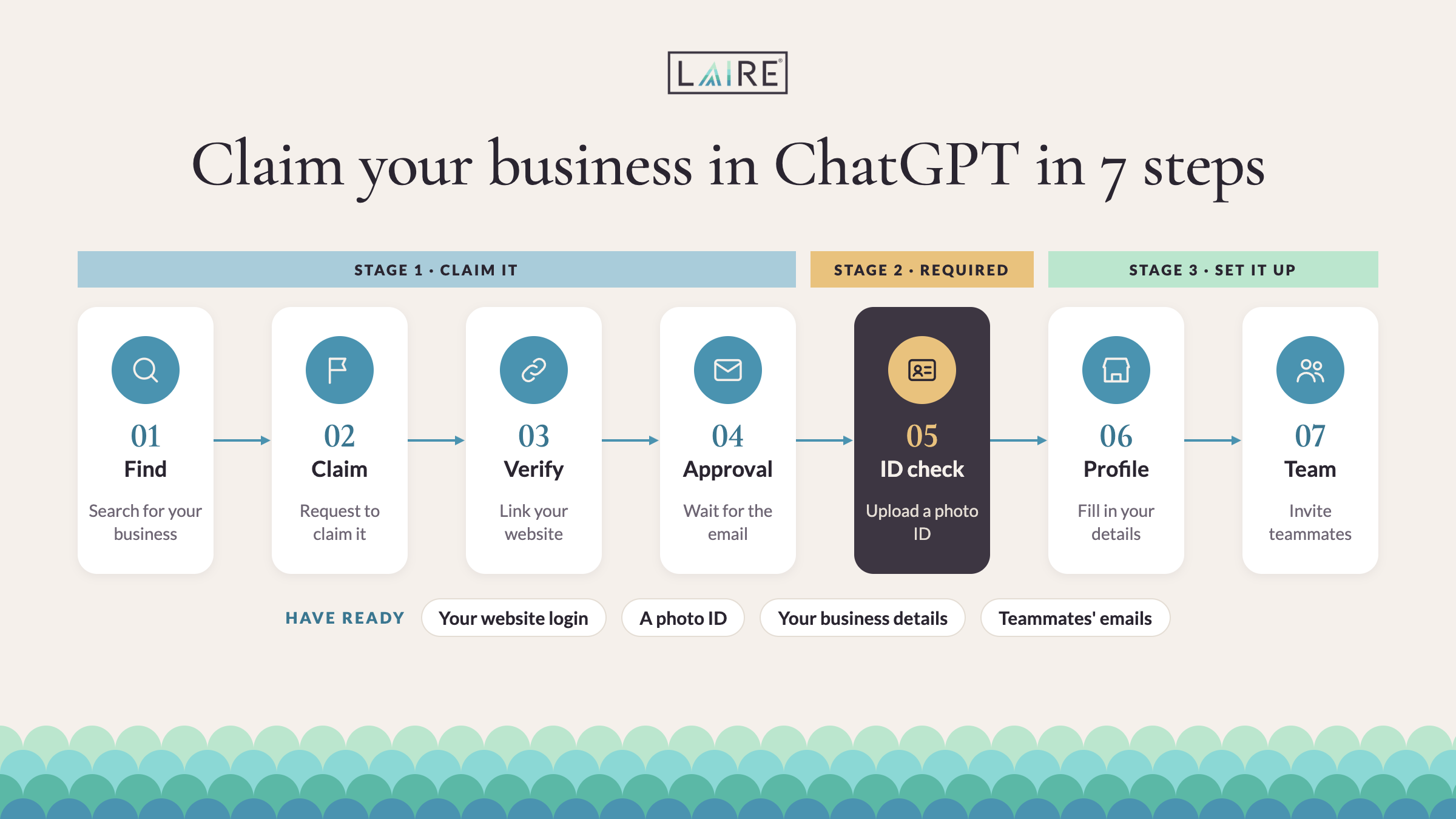
The claim itself is quick. Most of the waiting happens between steps 4 and 5, while OpenAI reviews your claim and Persona checks your identity.
- Use a company-owned account. Sign in with an owner or admin whose access stays with the business. Never claim through a personal or agency login, or you can lose access to your own profile when staff or agencies change.
- Find your listing. Open Business Hub from the ChatGPT sidebar or at chatgpt.com/business-hub and search for your business. Check the name, website and location before you select it. Some eligible online businesses can add a listing if none exists.
- Verify your connection to the business. Choose one of the methods OpenAI offers you (see the table below) and complete it.
- Wait for claim approval. OpenAI reviews the claim and emails you an approval or a request for more documents. There's no guaranteed turnaround.
- Complete Persona verification. It's a separate identity and authority check, and you need it before you can publish changes, view insights or create an agent. Have ID, company registration details and proof you can act for the business ready.
- Configure your profile. Update your website, description, category, logo and policies. Retailers can connect a product feed.
- Add your team. Invite colleagues and your agency through Business Hub instead of sharing a login.
Pick the verification method you control. If the phone number on file is outdated, don't try to verify it.
|
Method |
What it involves |
Tip |
|
Business phone |
A code by text or automated call |
Use only a number you recognize and control |
|
Business email |
A code sent to a company address |
Use a durable company inbox, not a person's |
|
Website domain |
A TXT record added to your DNS |
Best when phone data is wrong; allow time for DNS to update |
|
Shopify |
Authorize your store |
The natural route for Shopify merchants |
Whichever method you use, Persona verification (step 5) comes after it as a required second stage. It asks for ID plus company records, so make sure the legal name you give matches your registration.
If something gets stuck, these four fixes cover most cases:
- Someone already claimed your business: open the three-dot menu on the listing and select Dispute ownership.
- The status says "Contact support": the listing is locked, so go through OpenAI Support.
- Your claim is approved, but you can't see insights: Persona verification is probably still pending.
- Your edits aren't showing: OpenAI reviews changes, and ChatGPT also draws on other sources, so updates can take time to appear.
Write a profile description on ChatGPT a buyer could act on
The weakest profile is a directory blurb with a logo. A strong one helps a buyer decide whether you're relevant before they ever reach your site. For a B2B company, the description should cover five things:
- What you do: your main services or products, in specific terms.
- Who you do it for: industries, company types or roles.
- Which problems you solve: the needs a buyer would bring to you.
- What proves it: certifications, partnerships or results you can show.
- Where you work: markets served and how you deliver.
Here's the difference in practice, using an agency example:
- Less useful: "We are a leading, innovative, full-service agency delivering comprehensive solutions to help businesses achieve exceptional results."
- More useful: "We help B2B manufacturing and technology companies improve marketing and sales through HubSpot implementation, content strategy and campaign management."
The second version tells a buyer and ChatGPT who it's for and what it does, without filler. If your positioning isn't settled yet, start with defining your ideal customer profile and a clear unique selling proposition.
Your website has to back the profile up. OpenAI can supplement or replace what you submit using other sources, so the profile only holds if your site says the same thing. Give each important service its own page, show case studies and the E-E-A-T signals on your site, and fix outdated facts on the third-party sites that describe you.
One technical check takes five minutes: make sure your robots.txt and firewall don't block OAI-SearchBot, the crawler OpenAI uses for ChatGPT search. It's controlled separately from GPTBot, which crawls for model training, so you can allow one and block the other. Our AI visibility best practices cover the rest of the technical checklist.
Business Hub counts citations, and buyers act on recommendations
Business Hub insights cover the past 28 days and show three things: mentions, website clicks and discovery topics. For online businesses, a mention is recorded when ChatGPT references your website. It doesn't count every time ChatGPT names your company.
That definition misses most of how ChatGPT talks about a brand. We track 23 agency-selection prompts in HubSpot's AI visibility tool. Between October 14 and November 13, 2026, ChatGPT answered them 683 times and mentioned LAIRE in 164 of those answers, about one in four. The same answers carried 4,866 citations, and 59 of them pointed to lairedigital.com: 1.2%. A dashboard that counts website references would show a small fraction of how often ChatGPT talks about us.
Outside research points the same way:
- Unbranded questions rarely cite your own site. Resonance analyzed more than 1.3 million AI citations across 116 B2B technology brands and eight AI assistants. A brand's own website supplied 29% of citations when the question named the brand and 6% when it didn't. The unbranded question is where new customers find you.
- The most-cited brand often isn't the one recommended. In Parse's analysis of 103,679 AI answers with a clear citation leader, that brand ranked below first in 59% of them.
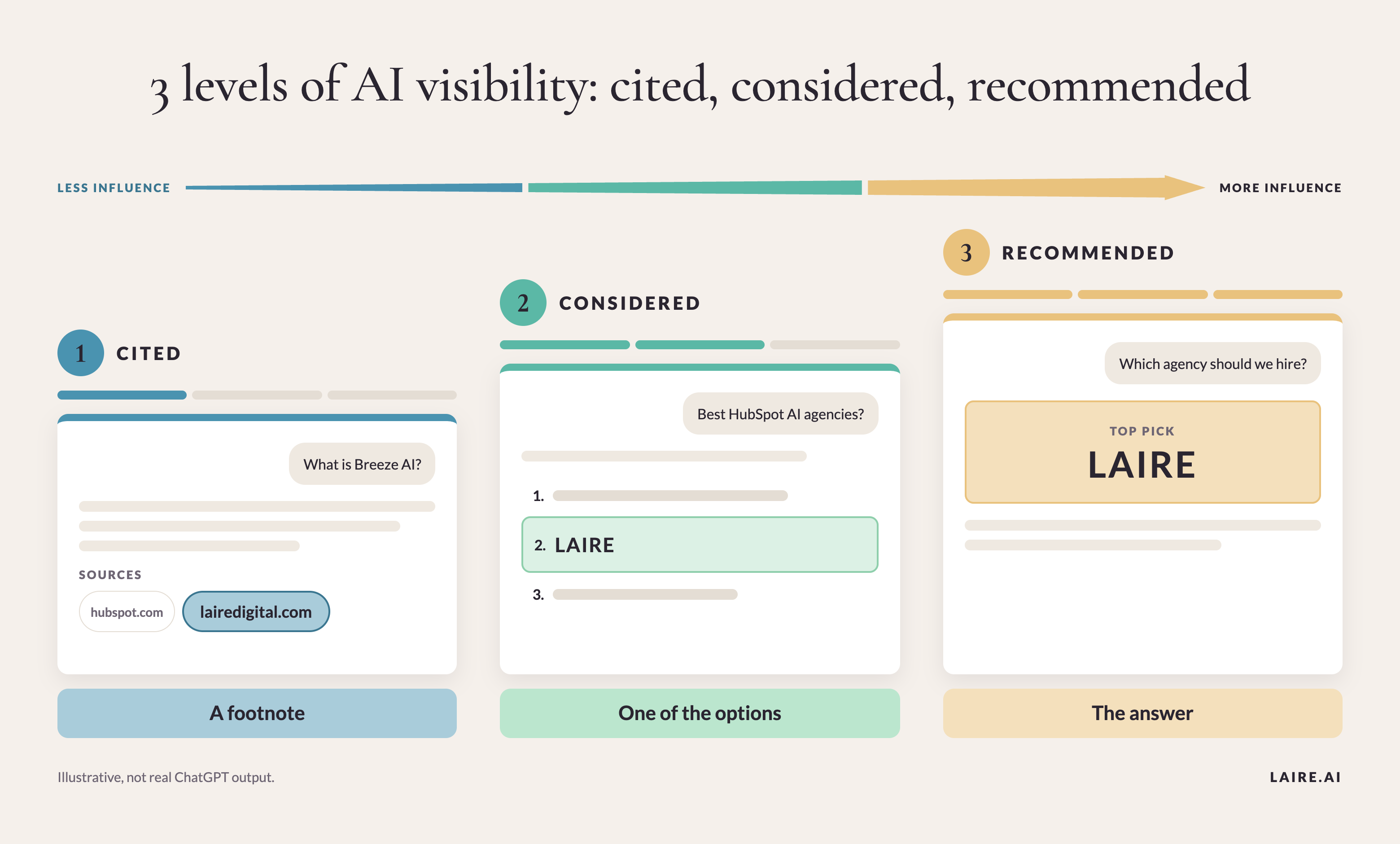
Both studies describe associations, not causes. Still, they show why a citation count can't tell you whether ChatGPT puts you on a buyer's shortlist. We use three levels to keep them apart:
|
Level |
What it means |
Example question we track |
|
Cited |
ChatGPT uses your website as a source |
"What is HubSpot's Breeze AI?" |
|
Considered |
ChatGPT lists you as a relevant option |
"Which agencies implement HubSpot AI for B2B companies?" |
|
Recommended |
ChatGPT suggests you for a specific need |
"Which agency should a US manufacturer choose for HubSpot and AI consulting?" |
These are LAIRE's working categories, not OpenAI metrics, and they aren't strictly sequential: ChatGPT can recommend a brand without citing its site. The third question is worth far more to us than the first, even though the first earns more citations. For a worked example in a regulated industry, see getting a financial firm cited by AI.
Measure what happens after you're mentioned by AI
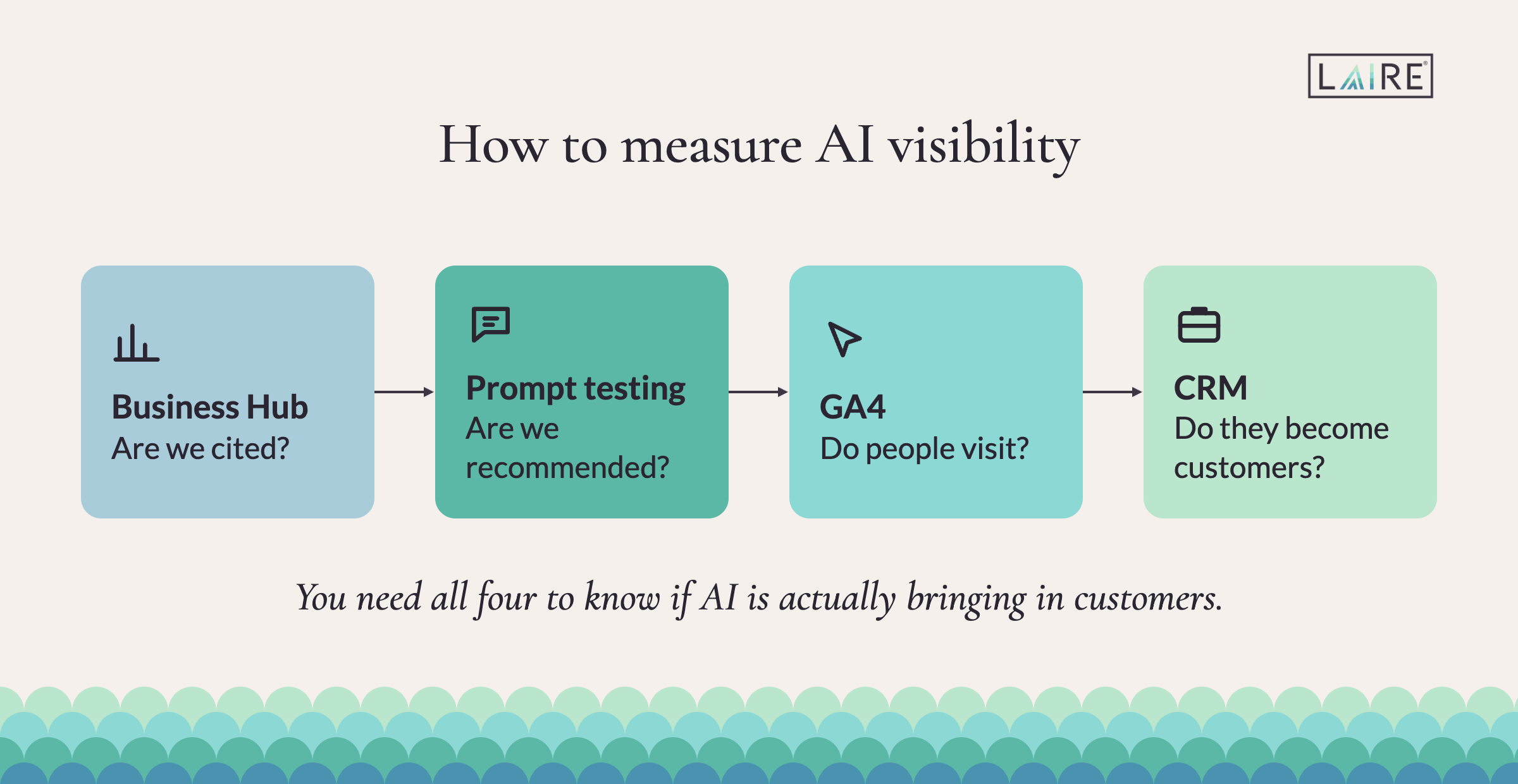
No single tool shows the whole path from a ChatGPT answer to a deal. Each one below answers a different question:
|
Tool |
What it shows |
What it can't show |
|
Business Hub |
Website references, clicks and discovery topics over 28 days |
The prompts people asked, competitors, or why ChatGPT chose an answer |
|
Fixed prompt testing |
Whether you appear, how you're described, who else is recommended |
Real customer conversations |
|
GA4 AI Assistant channel |
Sessions and key events from recognized AI assistants, added May 13, 2026 |
Visits that arrive without a referrer, which land in Direct |
|
HubSpot or your CRM |
Contacts, deals and revenue tied to those visits |
Influence from people who never click |
To run prompt testing, write 20 questions your buyers would ask, mixing branded, unbranded, comparison and problem-based ones. Run each three times under the same conditions, then log the date, the wording, the brands recommended, the sources cited and whether ChatGPT described you correctly. Repeat monthly. Synthetic prompts don't reproduce real buyers, so look for patterns rather than single answers.
Add "ChatGPT or another AI assistant" as an answer to the "How did you hear about us?" field on your main forms, because self-reported attribution catches influence that referral data misses. Then treat AI answers the way you'd treat Google AI Overviews: visibility can rise while clicks stay flat, so judge it by leads and deals, the same way you'd judge any other traffic source.
Record a baseline before you change your profile or your site. Discovery topics are themes, not raw prompts, and a blank chart can mean your activity sits below OpenAI's privacy thresholds, not that it's zero.
Read the terms before you publish your ChatGPT profile
Four points in OpenAI's setup guide and Businesses in ChatGPT terms are worth knowing before you publish:
- Published profiles can't be deleted. Only unpublished drafts can, and OpenAI Support won't delete, unpublish or hide a published profile as part of a setup or ownership request. Check every field first.
- You don't fully control the profile. OpenAI reviews your changes and can supplement or replace them with information from other sources.
- Insight data is confidential. An agency can use a client's Business Hub data on that client's behalf. Pooling several clients' data into a public benchmark is a different matter, and the terms restrict it.
- It's a beta. Claiming is free at launch, features can change, and OpenAI hasn't confirmed future pricing.
Business Agents make sense when buyers ask detailed questions
Eligible US e-commerce and online service businesses can publish a Business Agent: a branded assistant that answers questions using information you provide. A buyer can open it from your profile, and it can explain your offerings, compare plans and point people to the right page. It's separate from ChatGPT's own answer, and you can't read individual conversations.
An agent is worth testing if you sell several plans or complex options that buyers need help choosing between. Write it to tell people when you're not a fit, test it against your hardest customer questions, and don't sell it internally as an AI sales rep. For now, its job is helping buyers understand your offer before they visit your site.
Find out whether ChatGPT recommends you
Your Business Hub profile tells you when ChatGPT cites your website. It won't tell you whether ChatGPT recommends you to a buyer comparing providers, and that takes testing. Our free 20-minute AI Readiness Assessment includes an LLM analysis that shows where you appear in AI answers and where competitors win.
Questions to ask before you claim your business in ChatGPT
Does claiming my business improve how often ChatGPT recommends us?
No. OpenAI says claiming a profile doesn't change its visibility in ChatGPT, and ChatGPT keeps making independent recommendations. Claiming lets you correct your information and see how often ChatGPT references your website. Recommendations depend on what your site and other sources say about you, which is why your service pages, case studies and third-party sources matter more.
Is Businesses in ChatGPT the same as ChatGPT Business?
No. Businesses in ChatGPT is your company's public profile inside ChatGPT, managed through Business Hub. ChatGPT Business is OpenAI's paid workspace subscription for employees. You don't need a ChatGPT Business, Enterprise or ads account to claim a profile.
Can our marketing agency manage our ChatGPT profile for us?
Yes, through team access in Business Hub. Claim the profile with a company-owned account, then invite your agency as users. Don't share logins or let an agency claim under its own account. That keeps ownership with you if the relationship ends.
What if someone else already claimed our business in ChatGPT?
Open the listing in Business Hub, select the three-dot menu and choose Dispute ownership. If the listing shows a "Contact support" status, it's locked, and you'll need to go through OpenAI Support. Disputing ownership doesn't change how visible the profile is in ChatGPT.
How long does ChatGPT business verification take?
OpenAI doesn't guarantee a turnaround. The claim and the Persona identity check are reviewed separately, and DNS verification can add time while your TXT record propagates. Have your company registration documents and proof of authority ready to avoid back-and-forth.
Will it stay free?
Claiming a profile and publishing a Business Agent are free at launch, and you don't need to buy ads. OpenAI hasn't confirmed future pricing, and the product is in beta, so features and terms may change.
Last verified against OpenAI's Help Center on November 16, 2026.