Most growing law firms end up running two systems that barely speak to each other. Clio or MyCase runs the practice: matters, billing, trust accounting, and documents. HubSpot for law firms drives growth across marketing, intake, and the pipeline that turns an inquiry into a retained client. Both do their jobs well—the revenue leaks in the space between them.
That gap is where leads stall, data gets keyed twice, and no one can say which marketing effort actually produced a signed client. Close it, and you get one clear view of the whole journey, from first click to open matter, without asking your team to be the integration.
Here’s what the gap looks like, what bridging it really means, and how to connect the two systems the right way.
The Short Answer: Connecting HubSpot and Clio or MyCase
You bridge HubSpot and a legal practice-management system by connecting them through an integration so data flows both ways. HubSpot handles marketing, intake, and pipeline; Clio or MyCase handles the matter once a client signs. A connection, built through each tool’s API using an iPaaS or custom integration, ends double entry and finally ties marketing spend to real, retained clients.
Key takeaways:
- Clio and MyCase manage the matter; HubSpot manages the growth and intake that comes before it.
- The cost of disconnected systems is double entry, lost leads, and zero marketing attribution.
- Both platforms offer APIs, so a connection is achievable, usually as a custom integration rather than plug-and-play.
- Once the data is joined, you can attribute revenue and see the full pipeline in one place.
- This is HubSpot implementation work, not basic onboarding.
HubSpot for Law Firms: Where It Fits Alongside Clio and MyCase
The two tools solve different halves of the firm, and both are right to exist. A legal practice-management platform is built for everything after someone becomes a client. HubSpot is built for everything that gets them there, which is why so many firms use it as their CRM for law firms and marketing engine.
Here’s how the responsibilities usually split:
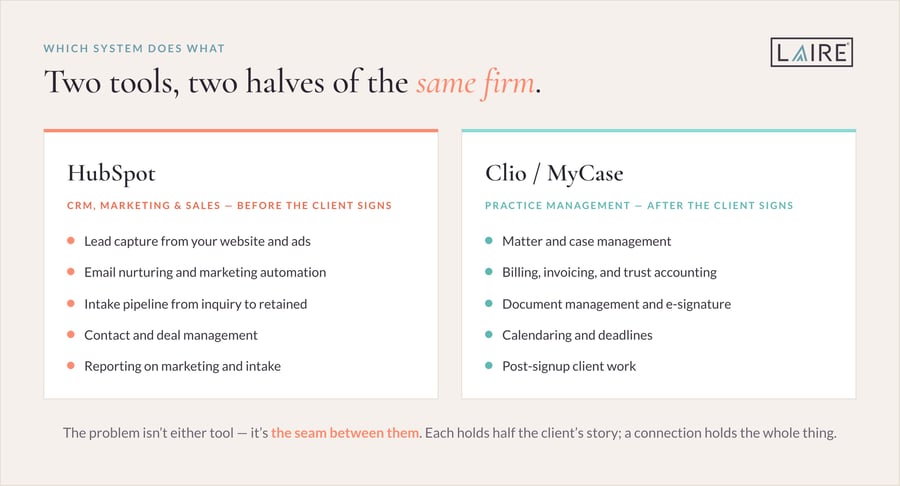
The problem isn’t either tool. It’s the seam between them. A law firm CRM and a practice-management system each hold half of the client’s story, and without a connection, no one holds the whole thing.
Where the Gap Costs You: Signs Your Systems Aren’t Talking
When HubSpot and your practice-management tool run separately, the symptoms are easy to recognize. If more than a couple of these sound familiar, the gap is already costing you:
- Your team keys the same client into two systems by hand.
- Inquiries stall between the website form and the intake conversation.
- You can’t tell which marketing source produced a retained client.
- Pipeline visibility stops at “consultation booked.”
- Reporting can’t connect ad spend or content to signed matters.
- Follow-up depends on someone remembering to check both tools.
None of this means your process is broken. These are integration gaps, not people problems, and they’re exactly what a connection is built to fix.
What Bridging HubSpot and Clio or MyCase Actually Looks Like
Bridging the gap doesn’t mean replacing either system. It means letting them share the data each one needs, at the moment it matters.
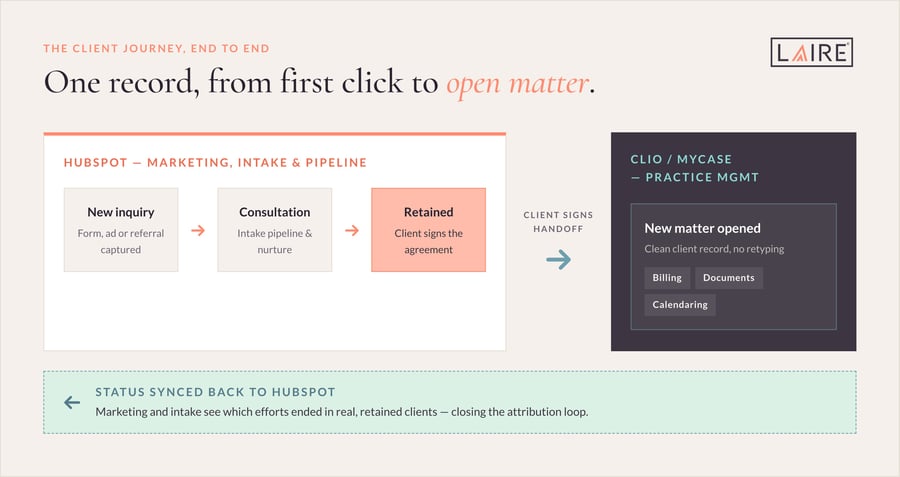
In practice, HubSpot owns the top of the funnel. A prospect finds the firm, fills out a form, and enters an intake pipeline that moves from new inquiry to consultation to retained. When the client signs, that record hands off to Clio or MyCase as a new matter, so the practice side starts with clean information and no retyping. Status can then flow back to HubSpot, so marketing and intake can see which efforts ended in real clients.
The result is one continuous view of the client journey, with each system doing the part it does best.
How to Connect HubSpot and Clio or MyCase
Start with one question that decides everything else: does the tool have an open API? Both Clio and MyCase offer developer APIs, which means a real, data-level connection is possible rather than manual exports. From there, the right method depends on how much data you’re moving and how complex the mapping is.
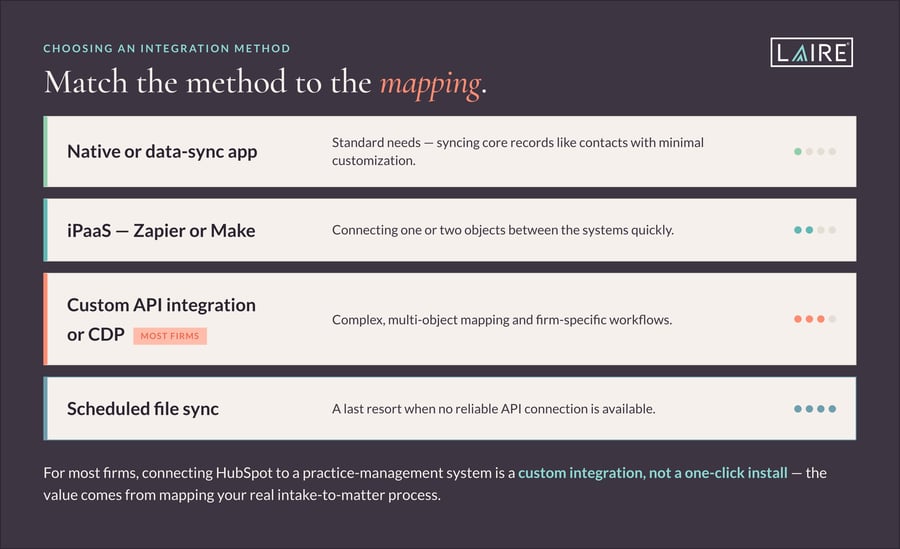
For most firms, connecting HubSpot to a practice-management system is a custom integration rather than a one-click install. That’s normal, and it’s the honest expectation to set: the value comes from mapping your real intake-to-matter process, not from a generic connector.
Why This Is HubSpot Implementation, Not Just Onboarding
A process-aware integration is implementation work, not a guided tour of the platform. Onboarding teaches your team how HubSpot works; implementation builds HubSpot around how your firm actually runs, including the connections to your other tools. If you’re weighing the two, our guide to HubSpot onboarding vs implementation breaks down which path fits.
The core of the build is mapping your HubSpot intake pipeline stages to the point where a matter opens in Clio or MyCase, then deciding which fields sync, in which direction, and when. Get that handoff right, and the rest of the system falls into place.
See the Full Picture: Attribution and Pipeline Reporting
This is the payoff. Once the systems are connected, you can finally answer the question every firm owner asks: where do our best clients come from?
Two HubSpot capabilities make it concrete. The Record Source property captures how each contact first entered your CRM, so you can trace a signed client back to the campaign, referral, or page that started it. And the right set of pipeline reports lets you watch intake health end to end, from new inquiries to retained matters. Paired with law firm marketing automation, that visibility turns guesswork into a repeatable growth engine.
Keep Client Data Protected Across Systems
Because a law firm handles confidential information, the integration should be as disciplined as the rest of your practice. Sync only the fields each system genuinely needs, control who can see what, and honor your retention and conflict rules on both sides.
A well-designed connection actually strengthens data hygiene, because information lives in the right place instead of being copied around. Keep the sync scoped and intentional, and confirm any client-data handling against your firm’s own policies.
Your HubSpot and Clio/MyCase Integration Checklist
Pulling it together, here’s the path from disconnected tools to one connected system:
|
Step |
What it involves |
|
Audit both systems |
List what lives in HubSpot vs Clio/MyCase and where they overlap |
|
Confirm API access |
Verify your plans support the API connection you need |
|
Map objects and stages |
Match contacts, deals, and intake stages to matters |
|
Choose the method |
Native, iPaaS, or custom, based on complexity |
|
Define the handoff |
Decide what syncs, in which direction, and when |
|
Build attribution reporting |
Set up Record Source and pipeline reports |
|
Test and train |
Validate the sync, then train the team on the new flow |
How LAIRE Helps Law Firms Connect HubSpot to Their Practice Stack
Connecting HubSpot to a practice-management system takes a partner who knows both the platform and the plumbing. As a HubSpot Diamond Solutions Partner, we build native and custom integrations, choosing the right method for your specific tools, and set up the RevOps and reporting that tie marketing to signed matters. Our clients have generated more than $1 million in additional revenue through our inbound approach, and we bring that same focus on revenue, not vanity metrics, to firms connecting their stack. See our HubSpot Integration Services for how the pieces fit together.
Frequently Asked Questions About HubSpot for Law Firms
Does HubSpot integrate with Clio?
Yes. Clio offers a developer API, so HubSpot can connect to it through an iPaaS tool like Zapier or Make, or through a custom integration for more complex needs. The right approach depends on how many records you’re syncing and how tailored your intake-to-matter process is.
Can HubSpot replace Clio or MyCase?
No, and it shouldn’t try to. HubSpot is a CRM and marketing platform; Clio and MyCase are legal practice-management systems with matter management, billing, and trust accounting that HubSpot doesn’t provide. The goal is to connect them, not to choose one over the other.
Do I need HubSpot if I already have Clio or MyCase?
Practice-management tools are built for work that happens after someone becomes a client. If you want to attract, nurture, and convert new clients, and to see which marketing produces them, you need a system built for that, which is where a law firm CRM like HubSpot comes in.
Is HubSpot a good CRM for law firms?
HubSpot is a strong CRM for law firms that want to unify marketing, intake, and pipeline reporting in one place. It manages contacts and deals, automates follow-up, and reports on what’s working, then hands signed clients to your practice-management system through an integration.
How much does a Clio or MyCase HubSpot integration cost?
It depends on the integration method and how complex your data mapping is. A simple two-object sync through an iPaaS tool costs far less than a custom, multi-object build. The best first step is to scope your actual workflow so the estimate reflects what you truly need.
Ready to Connect Your Systems?
Your practice-management tool and your marketing platform don’t have to live in separate worlds. Connected, they give you one view of every client, from first click to open matter, and finally show you which growth efforts are worth the investment.
Want to see what bridging HubSpot and Clio or MyCase would look like for your firm? Schedule a free 20-minute consult with LAIRE.