The best HubSpot alternatives fall into four groups: all-in-one suites like Zoho and ActiveCampaign, sales-led CRMs like Pipedrive and Freshsales, enterprise platforms like Salesforce and Microsoft Dynamics, and a fast-growing set of AI-native and custom CRMs like Attio and Breakcold. HubSpot is a strong all-in-one platform, and for many B2B teams it is still the right call. But it is not the only option, and it is not the best fit for every budget or model. This guide profiles nine real alternatives, reflects what users actually say, and helps you decide whether to switch or fix the setup you already have. We work in HubSpot every day, and we will keep this honest.
Why teams look for a HubSpot alternative
Most teams start shopping for a HubSpot alternative for one of two reasons: cost or complexity. Both are worth taking seriously before you decide anything.
In community discussions on Reddit and review sites, the same themes come up. People love that HubSpot is easy to use and brings marketing, sales, and service into one place. The frequent complaint is price, since HubSpot's cost can climb quickly as your contact database and seats grow, and users often vent that core automation sits behind higher Sales or Operations tiers. HubSpot moved to seat-based pricing in March 2024 and dropped its old seat minimums, which lowered the cost of entry, though the bill still scales with marketing contacts and paid seats as you expand. The second complaint is complexity, where large portals accumulate clutter and become hard to manage. Many also say the newer AI features feel undercooked, useful for summaries and suggestions more than for real decisions.
None of that makes HubSpot a poor product. It makes it a product with a profile, strong for connected all-in-one growth, less ideal for teams that want a lean sales tool or a rock-bottom price. Before you compare tools, get clear on which of those two problems you actually have, because the fix is different for each. If you are still deciding whether the platform fits at all, our take on whether HubSpot is right for your business is a good gut check.
HubSpot alternatives, grouped by need
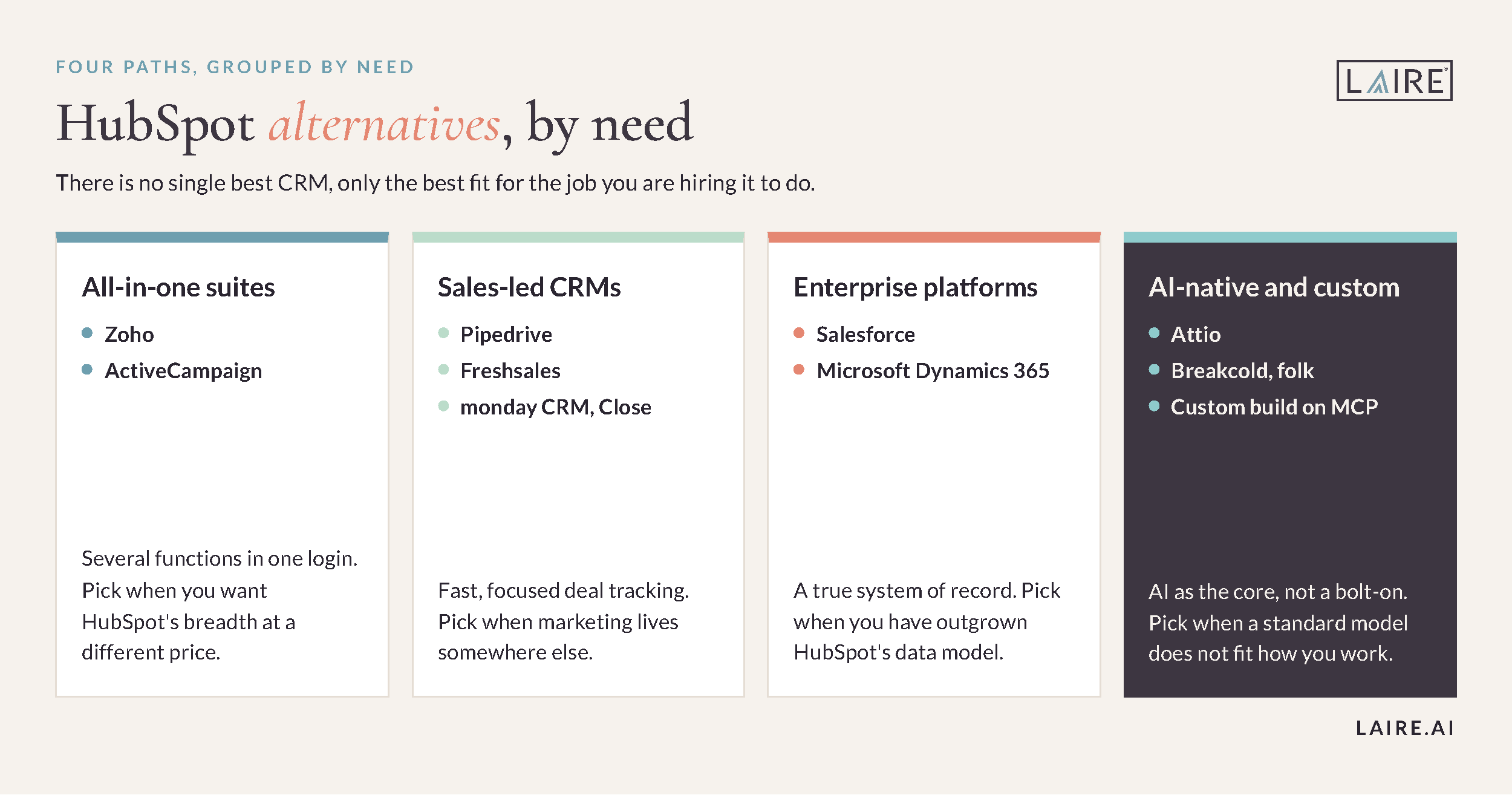
There is no single best CRM, only the best fit for your team. Here are nine options worth a look, sorted by the job you are hiring the tool to do. Use the table to shortlist, then read the profile for each tool you are considering.
|
Alternative |
Group |
Best for |
|
Salesforce |
Enterprise |
Large teams needing a customizable system of record |
|
Zoho |
All-in-one suite |
Suite breadth on a smaller per-seat budget |
|
ActiveCampaign |
Marketing automation |
SMBs that want deep email automation |
|
Pipedrive |
Sales-led CRM |
Simple, fast pipeline management |
|
Freshsales |
Sales-led CRM |
Budget teams wanting built-in phone and email |
|
monday CRM |
Sales-led CRM |
Teams already living in monday.com |
|
Attio |
AI-native CRM |
Flexible data models that feed AI and automation |
|
Breakcold |
AI-native CRM |
Founder-led sales across many channels |
|
Custom AI CRM (with MCP) |
Custom / AI |
Teams that want to build around their own workflow |
All-in-one and suite platforms
If you like HubSpot's all-in-one idea but want a different balance of price or depth, start here. These tools cover several functions in one place, so you keep the convenience of a single system.
Zoho is the broadest suite for the money. It bundles CRM, email, helpdesk, and analytics, and the wider Zoho One package adds dozens of business apps. That makes it a strong pick for cost-conscious teams that want a lot under one login. The tradeoff is polish and depth. Marketing automation and reporting feel less refined than HubSpot’s, and wiring the pieces together takes more hands-on work. Consider Zoho when budget is the main driver and you already use other Zoho apps.
ActiveCampaign is the choice when email and automation are the heart of your marketing. Its automation builder rivals HubSpot's Marketing Hub for a fraction of the cost, and it has added light CRM and sales features over time. The catch is that sales, service, and reporting stay thinner than a full suite. Consider ActiveCampaign when Marketing Hub feels too expensive for what you use, and a capable CRM on the side is enough. To see how the major platforms stack up, our marketing automation software showdown compares them directly.
Sales-led CRMs
If your team mainly needs to track deals and move them forward, a lighter sales-led CRM can beat an all-in-one. These tools stay fast, focused, and easy to adopt.
Pipedrive is the classic simple pipeline. It is built around a clean, visual deal view that reps actually keep updated, and it is quick to set up. Its limitation is marketing, which is basic, so most teams pair it with a dedicated email tool. Consider Pipedrive when you want a fast, no-friction deal tracker and your marketing lives elsewhere.
Freshsales, part of Freshworks, packs built-in phone and email into an affordable plan, with its Freddy AI assisting with lead scoring and next steps. That makes it appealing for budget teams that want communication tools included rather than bolted on. The tradeoff is a smaller ecosystem and less marketing depth than HubSpot. Consider Freshsales when price and built-in calling matter most.
The monday CRM sits on top of the monday.com work platform, so it fits teams already running projects there. Sales, tasks, and delivery live in one familiar place, which reduces tool sprawl. As a CRM it is younger, with lighter native marketing and service features. Consider monday CRM when your team already lives in monday and wants deals beside the work.
Close is worth a mention for outbound-heavy teams. It is built around calling and email volume, with a native dialer and SMS, so high-activity reps can run their whole day inside one screen. It is narrow by design, with little marketing or service, and it is priced for sales teams rather than whole go-to-market orgs. Consider Close when outbound calling is your core motion and speed matters more than breadth.
Enterprise platforms
Larger organizations often need a true system of record across sales, service, and finance. That is a different job than HubSpot's, and these platforms are built for it.
Salesforce is the most powerful and customizable CRM on the market, and IDC has ranked it the number one CRM provider worldwide for more than a decade. Its AppExchange ecosystem, custom objects, and Einstein AI let large teams model almost any process, which is why it becomes the right call past a certain size or when your data outgrows HubSpot’s structure. The cost is real complexity. It usually needs an admin or partner to configure and maintain, and pricing adds up across its clouds. Consider Salesforce when you have outgrown HubSpot’s data model or run a large, multi-team revenue operation. Our HubSpot vs Salesforce breakdown covers the common matchup in detail.
Microsoft Dynamics 365 is the natural fit for companies deep in the Microsoft ecosystem. It connects tightly with Teams, Outlook, and the wider Microsoft stack, and it scales to enterprise needs. Like Salesforce, it asks for IT involvement and a real implementation effort. Consider Dynamics when your organization already standardizes on Microsoft and wants the CRM to match.
AI-native and custom CRMs, including MCPs
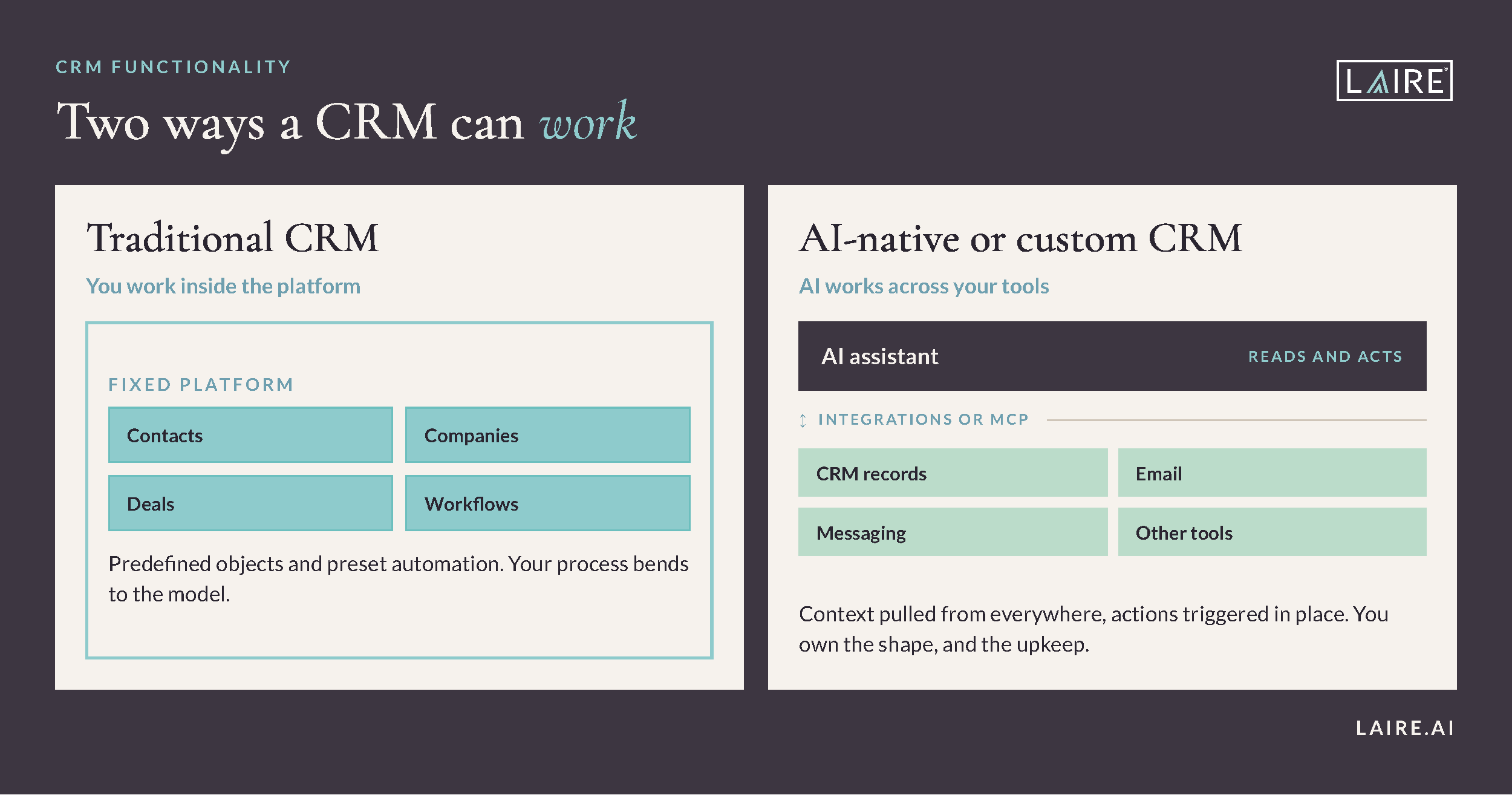
A newer group of AI-native CRMs has arrived, and it is the most interesting shift in the category. These tools treat AI as the core of the product, not a feature bolted on later.
Attio is built around a flexible data model, so records are not locked to the usual contact, company, and deal structure. AI blocks run inside its workflows, which appeals to product-led and technical teams that want the CRM shaped around their business. The tradeoff is setup. It can get complex; its automation runs on credits that climb as you scale, and getting full value often takes real configuration. Consider Attio when a standard CRM model does not fit how you actually work.
Breakcold takes an AI-first, multichannel approach, pulling email, LinkedIn, and messaging into one inbox where records update as conversations happen. It suits founder-led and small sales teams selling across channels. Being young, it is lighter on enterprise features and large-team governance. Consider Breakcold when you run high-touch, multichannel outreach with a small team. Tools like folk fit a similar niche for solo operators who want something lightweight. A cluster of newer entrants, including Day AI, Clarify, and Lightfield, is worth watching too, though most are still early and maturing toward a full CRM rather than a focused assistant.
The most forward-looking option is a custom AI CRM. Instead of buying a fixed platform, some teams assemble a lean core and connect AI models through the Model Context Protocol, or MCP, an open standard for linking AI assistants to outside tools and data. That lets an assistant read and update records, pull context, and trigger actions across their tools. The upside is a system shaped entirely around your workflow. The cost is ownership, since it demands engineering time to build and maintain, and the space is still early. Consider it only when off-the-shelf tools genuinely do not fit and you have the technical capacity to support it. It pairs naturally with modern AI tools like ChatGPT, Gemini, and Claude, and our AI consulting services can help you judge what is realistic today.
Should you build your own CRM with AI?
For most teams, the honest answer is no. Building a custom AI CRM is tempting, but it rarely beats a mature platform out of the box.
The conversation is real and growing. On Reddit, frustrated teams increasingly describe building self-hosted or custom AI CRMs to escape HubSpot’s pricing, and a wave of "CRM for the AI era" projects promise a system shaped entirely around you. The appeal makes sense: lower cost at scale, full control, and AI wired into your exact workflow. If you have engineering to spare and a genuinely unusual model, that path can work.
Three things temper the excitement, and they come straight from the same community threads. First, governance. HubSpot users point out that even mature platforms struggle with staging, rollback, and change control for automation, so a homegrown build starts with none of that and breaks quietly as it grows. Second, data. A common refrain is that AI on top of messy data just produces bad output faster, so AI does not fix a broken process, it scales it. Third, ownership. A custom CRM is a product you now maintain forever, including security, integrations, and onboarding.
This is where HubSpot out of the box still earns its place. You get unified marketing, sales, and service data, mature integrations, and a support ecosystem on day one, not after months of building. HubSpot is also absorbing AI natively through Breeze and adding guardrails over time, so the gap a custom build would fill keeps narrowing. And the recurring wisdom on Reddit applies to buyers and builders alike: the problem is usually the process, not the platform. Fix the setup, get your data clean, then layer AI on top. For most teams that is faster, cheaper, and far less fragile than building a CRM from scratch.
How to choose the right HubSpot alternative
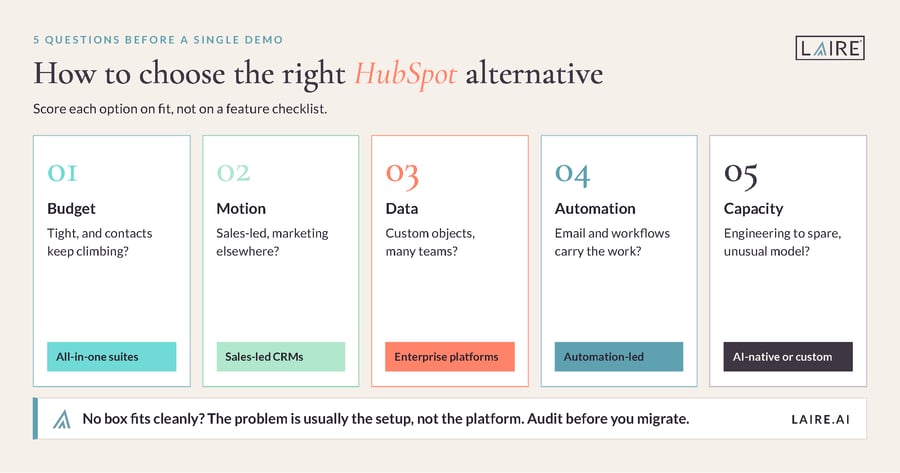
Once you know your reason for looking, five questions narrow the field fast. Answer them before you sit through a single demo.
First, what is your budget per seat, and how will it grow as you add contacts? Second, is your motion sales-led, marketing-led, or both, since that decides suite versus focused CRM? Third, how complex is your data, and does your business fit a standard contact-company-deal model or need custom objects? Fourth, how much do you rely on built-in marketing automation versus a separate tool? Fifth, do you have the technical capacity to configure and maintain a heavier platform or a custom build?
Score each option against those five, not against a feature checklist. A tool that wins on features can still lose on fit. The right choice is usually the one that matches your model with the least setup and the most room to grow. If you want a gut check before committing, a platform-agnostic partner who works across these tools can help you weigh fit against the real cost of switching.
Should you switch, or optimize what you have?
Before you migrate, ask an honest question: is the platform the problem, or is the setup? For a large share of frustrated HubSpot teams, the tool is fine and the configuration is the issue.
A messy portal, unused features, and years of clutter can make any CRM feel expensive and slow. We often see a team blame HubSpot for weak reporting when the real cause is duplicate records and half-built workflows. Clean those up, and the same platform suddenly looks a lot more capable and a lot less expensive. Migrating carries real cost too, in money, time, lost history, and retraining, and it rarely fixes a process that was never clean to begin with. That is why a portal audit is often the smarter first step, and why clean CRM data matters more than the logo on the login screen.
If you do decide to switch, plan the move carefully. Expect to export and map your data, rebuild automations and reports, reconnect integrations, and retrain your team, which usually takes weeks, not days. A staged migration with a clean data set and a clear owner beats a rushed cutover every time. And if you have genuinely outgrown HubSpot’s model or the costs no longer pencil out, switching is the right call. Just confirm you are using the CRM you have well first, because often the fastest win is a better setup, not a new platform.
Conclusion
The right HubSpot alternative depends on your team, your budget, and your model, not on any single ranking. Match the group to your reason for looking: a suite if you want all-in-one, a sales-led CRM if you want simple, an enterprise platform if you need a system of record, or an AI-native tool if you want to build around automation. Weigh the real cost of switching against the cost of fixing what you have. And whichever platform you choose, the setup will decide whether it works.
Frequently asked questions
What are the best alternatives to HubSpot?
The strongest alternatives depend on your need. Zoho competes as a broad suite and ActiveCampaign as a marketing-automation-led option, Pipedrive and Freshsales as simple sales-led CRMs, Salesforce and Microsoft Dynamics at the enterprise level, and Attio and Breakcold as AI-native options. Some teams also build a custom AI CRM using MCP connectors. Start by naming why HubSpot is not working, then pick the group that solves it.
Why do companies leave HubSpot?
The two most common reasons are cost and complexity. HubSpot’s pricing can rise sharply as contacts and seats grow, and large portals can become cluttered and hard to manage. Some teams also want a leaner sales tool or a more flexible data model. Many companies stay, though, because the all-in-one convenience and existing training outweigh the cost of switching.
Is there a cheaper alternative to HubSpot?
Yes. Zoho, Freshsales, Pipedrive, and monday CRM generally start at lower price points than comparable HubSpot tiers, and several AI-native tools price aggressively. Be careful to compare total cost, since usage-based pricing and add-ons can climb. The cheapest option is only a bargain if it still does the job your team needs.
What is the best AI CRM alternative to HubSpot?
Attio is a popular choice for teams that want a flexible, AI-friendly data model, while Breakcold suits founder-led, multichannel sales. Both treat AI as core rather than a bolt-on. The tradeoff is maturity, since these platforms are newer and lighter on enterprise features. Teams with technical ownership can also build a custom AI CRM connected through MCP.
Should I build my own CRM with AI instead of using HubSpot?
For most teams, no. Building a custom or self-hosted AI CRM can lower costs and give full control, but it means owning governance, data quality, security, and maintenance yourself. AI on messy data just produces bad output faster, so it does not fix a broken process. A well-configured platform like HubSpot gives you unified data, integrations, and native AI on day one, which is usually faster and less fragile. Custom builds fit technical teams with an unusual model and engineering to spare.
Should I switch from HubSpot or optimize what I have?
Often the smarter first move is to optimize. Many complaints about HubSpot trace back to a cluttered portal or an unclean setup rather than the platform itself. Run an audit, clean your data, and confirm you are using the features you pay for. If you have genuinely outgrown HubSpot or the costs no longer make sense, then a planned switch is worth it.
Not sure whether to switch or optimize? LAIRE is a HubSpot Diamond Solutions Partner, a tier fewer than 3 percent of HubSpot’s partners reach, and we help teams choose, set up, and get real value from the right platform. See how our HubSpot Solutions Partner team can help, and book a 20-minute call to talk it through.