HubSpot implementation is the process of configuring and connecting HubSpot so it fits how your business actually sells. It covers your data, CRM setup, tools, automation, and integrations. Done well, it turns HubSpot into a system your team relies on every day. If it is done poorly, HubSpot becomes an expensive contact list. Teams rush the setup, skip the data work, and wonder months later why adoption is low and reporting does not add up. The platform was never the problem. The plan was.
This guide walks B2B teams through HubSpot implementation step by step, from what to prepare through launch and optimization. Follow it to run the project yourself, or to scope it confidently with a partner.
What is HubSpot implementation?
HubSpot implementation is the strategic and technical work required to make the platform fit your business. The result should be a usable CRM with agreed data definitions, documented processes, working integrations, tested automation, relevant reporting, and clear ownership.
A complete implementation usually includes:
- Business goals, scope, success metrics, and project ownership
- CRM data model, properties, associations, lifecycle stages, and pipelines
- Data audit, cleanup, mapping, migration, and validation
- Sales, marketing, service, and reporting tools included in the project scope
- Automation, integrations, permissions, and governance
- Role-based training, launch support, and post-launch optimization
What is the difference between HubSpot implementation and onboarding?
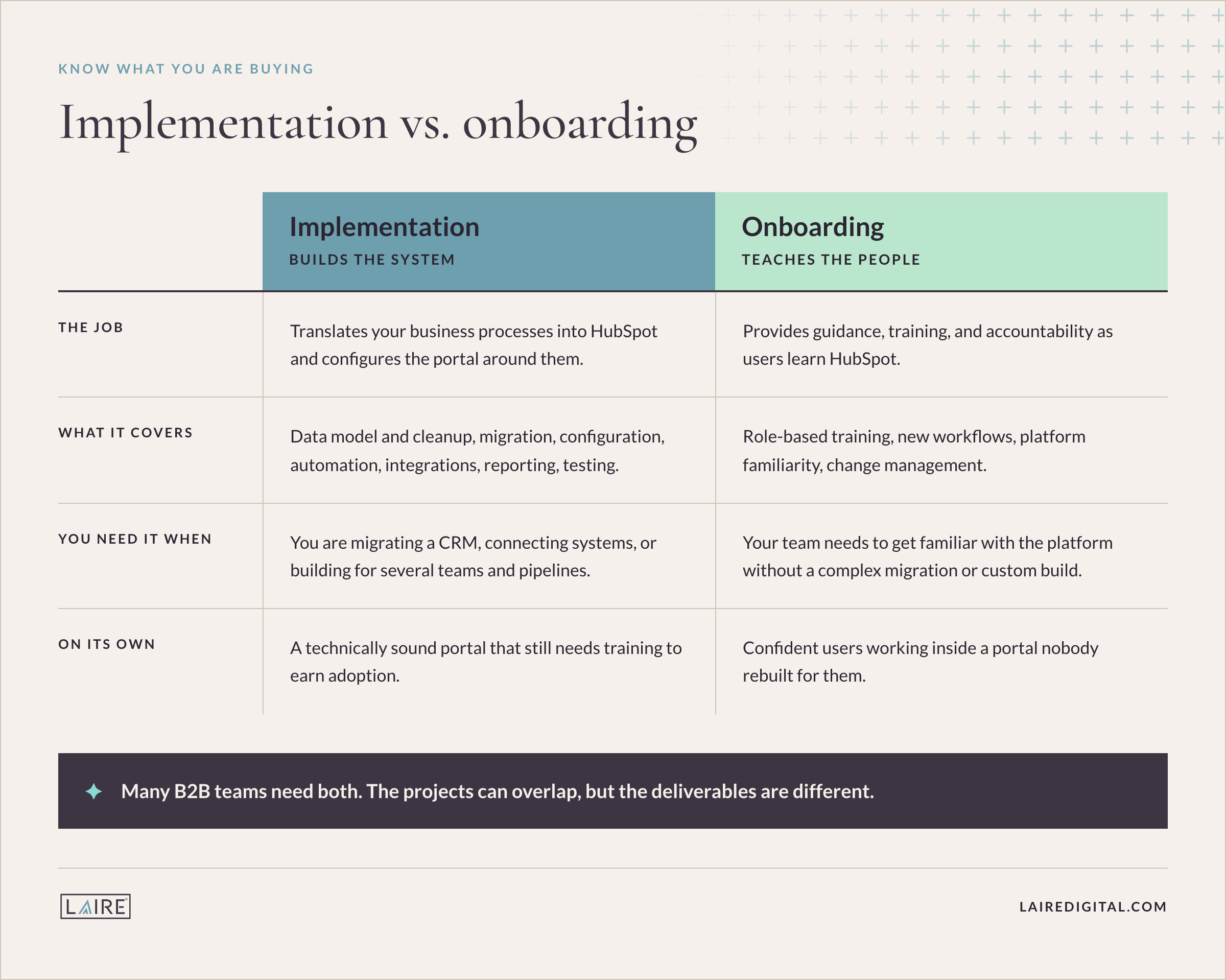
Implementation builds the system. It translates your business processes into HubSpot, configures the portal, prepares and migrates data, connects other systems, and tests the finished setup.
Onboarding teaches people how to use the system. It provides guidance, training, and accountability as users learn HubSpot and adopt their new workflows.
Many B2B teams need both. The projects can overlap, but the deliverables are different. HubSpot onboarding can help a team get familiar with the platform without completing a complex migration or custom build. Implementation can deliver a technically sound portal, but it still needs training and change management to earn adoption. If you are deciding what level of support you need, compare HubSpot onboarding vs. implementation.
What should you do before a HubSpot setup?
Make the important business decisions before anyone starts creating properties or workflows. A short discovery phase prevents rework later.
- Define the business case. State the problem HubSpot must solve, the outcomes you expect, and the metrics that will show whether the implementation worked.
- Assign ownership. Name an executive sponsor, a project lead, and process owners from sales, marketing, service, and operations. Give one person authority to resolve cross-functional decisions.
- Set the scope. Confirm which Hubs, tools, teams, business units, regions, integrations, and historical records belong in phase one. Separate launch requirements from later improvements.
- Confirm the subscription. Check that the edition, seats, and add-ons support the features in your scope before you design around them. Use LAIRE's guide to understand how much HubSpot costs.
- Set a realistic timeline. Work backward from launch, then leave time for data preparation, stakeholder review, testing, training, and corrections. A hard deadline does not remove that work.
HubSpot implementation: A step-by-step process
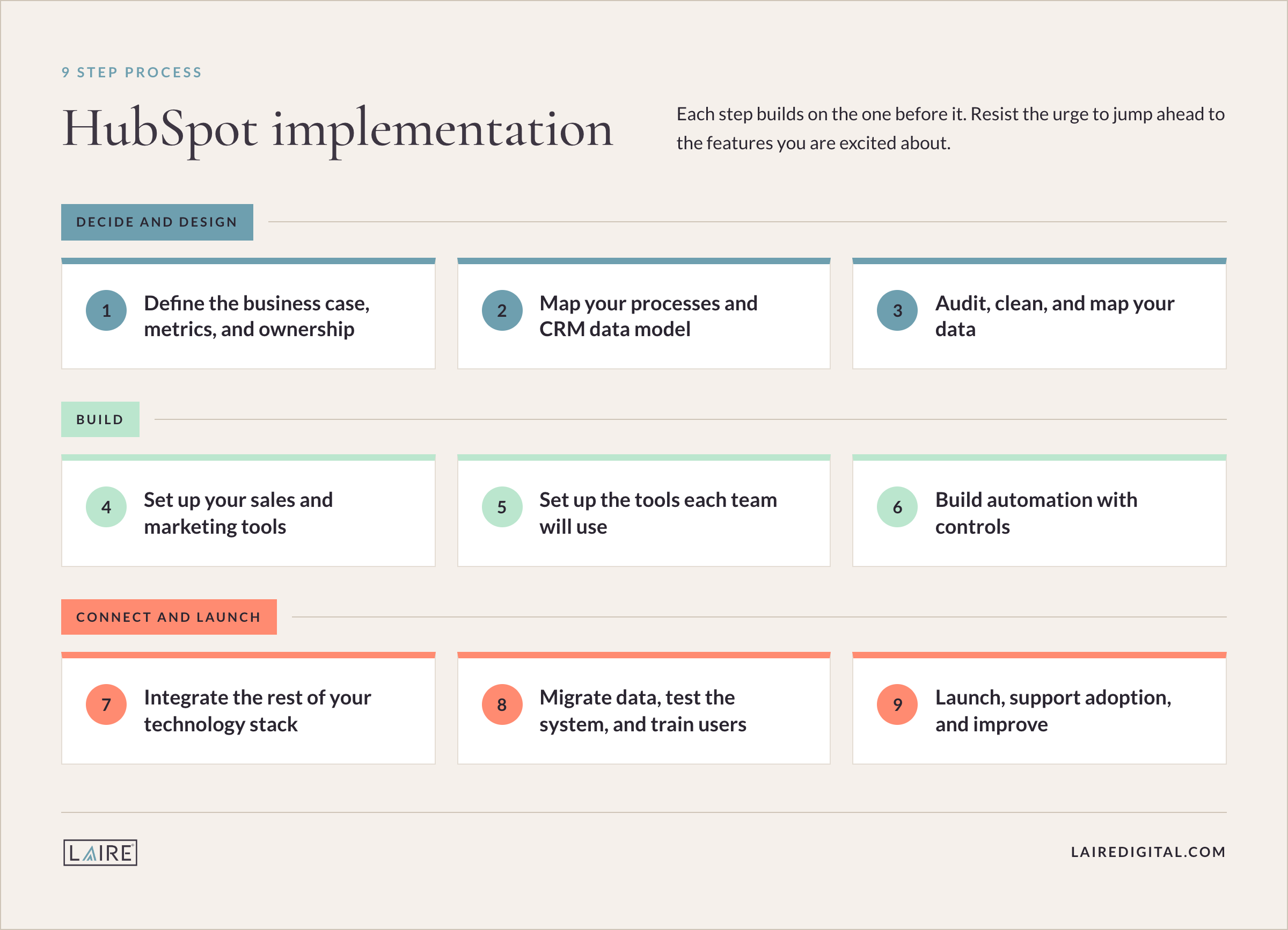
A successful HubSpot implementation follows a clear sequence. Each step builds on the one before it, so resist the urge to jump ahead to the features you are excited about.
Step 1: Define the business case, metrics, and ownership
Write down what must improve after launch. Good goals describe a business outcome and a measurable change, such as reducing lead response time, increasing the percentage of deals with a known source, improving forecast accuracy, or giving service teams a complete customer history.
For every goal, document the baseline, target, data source, reporting cadence, and owner. Then create a simple responsibility map for the project. The executive sponsor removes roadblocks, the implementation lead manages scope and decisions, process owners define requirements, and end users test whether the design works in real situations.
Deliverable: an approved project brief with scope, success metrics, owners, milestones, and a list of phase-two requests.
Step 2: Map your processes and CRM data model
Document how a person or account moves from first touch through sales and customer service. Define qualification criteria, handoffs, stage-entry and stage-exit rules, required information, ownership changes, and exceptions. Do this with the people who run the process, not from an idealized flowchart.
Translate that process into a data model. Decide which information belongs on contacts, companies, deals, tickets, or custom objects, and how those records should be associated. Agree on shared definitions for terms such as lead, marketing qualified lead, sales qualified lead, opportunity, customer, and churned customer. Your lifecycle stages should describe the relationship with your business; deal stages should describe the status of a specific sales opportunity.
Deliverable: a process map, object-and-association model, field dictionary, lifecycle definitions, and pipeline stage criteria.
Step 3: Audit, clean, and map your data
Inventory every data source that will feed HubSpot, including spreadsheets, the current CRM, website forms, event tools, customer systems, and integrations. Identify duplicates, invalid records, missing required values, inconsistent formats, outdated owners, unused fields, and conflicting definitions.
Decide what to migrate, archive, enrich, or leave behind. Standardize values before import and choose a reliable unique identifier for each object. This matters because HubSpot uses identifiers such as email address, company domain name, Record ID, or a custom unique-value property to match records. Imports involving multiple objects also need a plan for preserving associations between records. HubSpot's official guidance explains how to prepare and import multiple objects.
Good CRM data hygiene protects every workflow, segment, and report built later. Cleaning a source file is also safer than trying to untangle a live portal after a bulk import.
Deliverable: a source inventory, cleanup log, deduplication rules, property map, association map, and approved migration files.
Step 4: Configure the CRM foundation and access
Build the core structure before adding advanced tools. Configure default and custom properties, record layouts, teams, users, permissions, lifecycle stages, lead and deal pipelines, ticket pipelines where needed, currencies, and naming conventions. Set clear rules for when a record or deal can move to the next stage and which fields must be complete.
Keep the design as simple as the business allows. Every extra property, pipeline, and stage adds maintenance. If two teams follow genuinely different processes, separate pipelines may be appropriate. If the difference is only a label or owner, one pipeline may be easier to report on. Limit access according to each role, and reserve broad administrative permissions for the people who need them.
Deliverable: a configured CRM foundation with documented naming standards, field ownership, stage rules, and user permissions.
Step 5: Set up the tools each team will use
Configure the tools included in the first release around real work. Marketing may need tracking, forms, subscription types, lists, campaign structure, email templates, and lead capture. Sales may need email and calendar connections, meeting links, snippets, templates, sequences, tasks, products, quotes, and pipeline views. Service teams may need inboxes, ticket routing, knowledge base tools, surveys, and service-level reporting.
Build the essential dashboards at the same time. Reporting requirements often expose missing properties or unclear definitions, so waiting until the end creates avoidable rework. Start with the sales pipeline reports and operational reports leaders need to run the business.
Deliverable: a prioritized set of configured tools, templates, views, and dashboards tied to the project goals.
Step 6: Build automation with controls
Automate stable, repeatable processes first. Common early workflows assign new leads, create tasks, update lifecycle stages, send internal alerts, manage data formatting, and trigger follow-up. Define the enrollment criteria, re-enrollment rules, suppression logic, owner, and expected outcome for every workflow.
Test each branch with sample records before turning it on. Watch for loops, conflicting workflows, unexpected overwrites, duplicate notifications, and actions that should stop when a person becomes a customer or opts out. Use a consistent naming convention and record why the automation exists so someone can maintain it later.
Deliverable: a documented, tested workflow library with owners, dependencies, and rollback steps.
Step 7: Integrate the rest of your technology stack
List every system that needs to exchange data with HubSpot. For each integration, define the business purpose, objects and fields in scope, sync direction, source of truth, matching logic, conflict rules, frequency, failure alerts, and owner. Decide what happens when a record is deleted, merged, or changed in both systems.
This governance is especially important when HubSpot connects to an ERP, billing platform, product database, or another CRM. A HubSpot and Salesforce integration, for example, needs explicit rules for which platform owns accounts, contacts, opportunities, campaign activity, and revenue data.
Deliverable: an integration specification, field mappings, ownership rules, error-handling plan, and test cases.
Step 8: Migrate data, test the system, and train users
Run a pilot import before the full migration. Validate record counts, required fields, owners, dates, picklist values, activities, and associations. Review the import error file, correct the source, and repeat until the results meet the acceptance criteria. Keep an untouched backup of the original data and document the final cutover steps.
Then test the portal end to end. Submit a form, create and qualify a lead, route it to a rep, open and advance a deal, trigger each critical workflow, confirm the integration sync, and verify the resulting dashboard. Include normal cases, exceptions, and records that should not enroll. LAIRE's guide to a successful HubSpot CRM migration covers the data work in more detail.
Train users by role and workflow. Sales reps need to know exactly where to find assigned leads, what must be entered before a stage change, and which reports managers will review. Administrators need separate training on governance, troubleshooting, and change control. Give users a sandbox or test records to practice with before launch.
Deliverable: validated production data, signed-off acceptance tests, role-based training, and a launch plan.
Step 9: Launch, support adoption, and improve
Launch with a clear cutover window, support channel, issue owner, and daily review cadence for the first days. Track login and usage patterns, incomplete records, workflow errors, integration failures, routing delays, and the business metrics defined in Step 1. Fix blockers quickly and keep enhancement requests in a prioritized backlog.
After the initial support period, move into regular governance. Review data quality, automation, integrations, permissions, reporting, subscription use, and user feedback on a set cadence. Schedule a broader HubSpot portal audit at least annually and after major changes to your go-to-market process, technology stack, or organizational structure.
Deliverable: an adoption dashboard, issue backlog, governance calendar, and named portal owner.
HubSpot implementation checklist
Use this condensed checklist to track the implementation from start to launch:
- Business goals, baselines, targets, and owners documented
- Executive sponsor, project lead, process owners, and approvers assigned
- Phase-one scope, subscription, budget, and timeline confirmed
- Sales, marketing, and service processes mapped with clear definitions
- Objects, properties, associations, lifecycle stages, and pipelines designed
- Source data inventoried, cleaned, deduplicated, mapped, and backed up
- Users, teams, permissions, naming conventions, and governance rules configured
- Required tools, templates, views, and reports set up
- Core workflows documented and tested with positive and negative cases
- Integrations connected with system ownership and error handling defined
- Pilot and full data migrations validated against acceptance criteria
- End-to-end user acceptance testing completed and signed off
- Role-based training delivered with supporting documentation
- Cutover, launch support, adoption tracking, and post-launch reviews scheduled
Why do HubSpot implementations fail?
HubSpot implementations usually fall short because the team treats configuration as the whole project. The technical build may be complete while the business decisions, data controls, and adoption plan remain unresolved.
- No shared definitions. Sales and marketing use the same fields and stages differently, so reports cannot answer basic revenue questions.
- Migration before design. The team imports old fields and processes before deciding what the new system should contain.
- Too much customization. Properties, pipelines, and workflows are created for every request, leaving a system no one can govern.
- Automation before process agreement. Workflows scale inconsistent decisions and make errors harder to trace.
- Reporting left until the end. Leaders discover too late that the portal does not capture the data required for the promised dashboards.
- Training without adoption management. Users see where to click, but they do not understand the required behavior, manager expectations, or reason for the change.
- No owner after launch. Data quality declines, integrations fail unnoticed, and temporary fixes become permanent architecture.
These patterns are the reason many companies feel they are not seeing results with HubSpot. The platform is capable. The setup and follow-through decide the outcome.
When should you bring in a HubSpot partner?
A capable internal administrator can lead a straightforward implementation when the scope is small, the data is clean, integrations are limited, and the team has time to make decisions and test the build.
Bring in a partner when the cost of rework is high or the internal team lacks implementation capacity. Typical signals include a migration from another CRM, several business units or pipelines, complex record associations, custom objects, ERP or Salesforce integration, advanced automation, a fixed launch date, or a history of low CRM adoption.
Evaluate partners on discovery quality, data migration methods, technical depth, testing process, training plan, documentation, post-launch support, and experience with businesses like yours. Partner tier is useful context, but the project team and delivery method matter too. LAIRE is a Diamond-tier HubSpot Solutions Partner with HubSpot Onboarding Accreditation and experience supporting more than 100 clients across inbound marketing, sales enablement, service, and portal optimization.
Build HubSpot around the way your team works
A strong HubSpot implementation begins with business decisions, then moves through process design, data, configuration, automation, integrations, testing, and adoption in that order. The goal is a system people trust because it reflects the work they do and produces information leaders can use.
Frequently asked questions
What does HubSpot implementation include?
HubSpot implementation includes project planning, process mapping, CRM architecture, data cleanup and migration, portal configuration, automation, integrations, reporting, testing, user training, launch support, and ongoing governance. The exact scope depends on the Hubs, teams, data, and systems involved.
How long does HubSpot implementation take?
A simple setup may take a few weeks. A multi-Hub implementation, CRM migration, or project with several integrations can take several months. Data quality, process complexity, customization, stakeholder availability, testing, and training are usually the main timeline drivers.
What is the difference between HubSpot onboarding and implementation?
Implementation builds and configures the HubSpot portal around your business processes, data, and systems. Onboarding provides guidance and training so administrators and users can learn the platform and adopt the new workflows. Many companies need both.
Can we implement HubSpot ourselves?
Yes. An internal team can implement HubSpot when the scope is straightforward and it has the time, platform knowledge, decision authority, and technical resources to manage data, integrations, testing, and training. A partner becomes more valuable as complexity and risk increase.
What should a HubSpot implementation checklist include?
The checklist should cover goals, scope, ownership, process definitions, CRM architecture, data cleanup, portal configuration, permissions, automation, integrations, migration, reporting, user acceptance testing, training, launch support, and post-launch governance. Each item should have an owner and acceptance criteria.
How do you know whether a HubSpot implementation was successful?
A successful implementation passes technical acceptance tests, produces trusted reports, supports the required workflows, and earns consistent user adoption. It should also improve the business metrics defined before the build, such as lead response time, data completeness, pipeline visibility, conversion rates, or forecast accuracy.
Planning a HubSpot implementation? See LAIRE's proven HubSpot setup process, then book a consultation to map the scope, risks, and right next step for your team.